
How to build your multi-agent AI system: A step-by-step guide
Content
Highlights
- Multi-agent AI systems enable specialized AI agents to work together toward a shared goal.
- You should start developing your agentic systems with business challenges in mind, not technology decisions.
- Orchestrator agents coordinate workflows across multiple agents, skills, tools, and data sources.
- Governance and adaptability are essential for enterprise-grade multi-agent systems.
- Skills help scale AI-driven processes through reusable organizational knowledge.
AI agents have become part of many organizations’ business operations. They help automate routine tasks and identify business opportunities, making your team’s work more efficient. But what happens when you are faced with more complex tasks that span several business functions? That’s where multi-agent AI systems come in.
This shift from collaborating with single intelligent systems to a team of specialized AI agents is happening in real time. Nearly 45% of organizations already scaling AI agents are piloting or scaling multi-agent systems (Capgemini Generative AI Report 2025). However, many lack the guidance to turn this agent network into real business value.
In the present article, you will get a step-by-step guide on how to successfully work with a multi-agent system and what’s possible within the Microsoft ecosystem.
What is a multi-agent AI system?
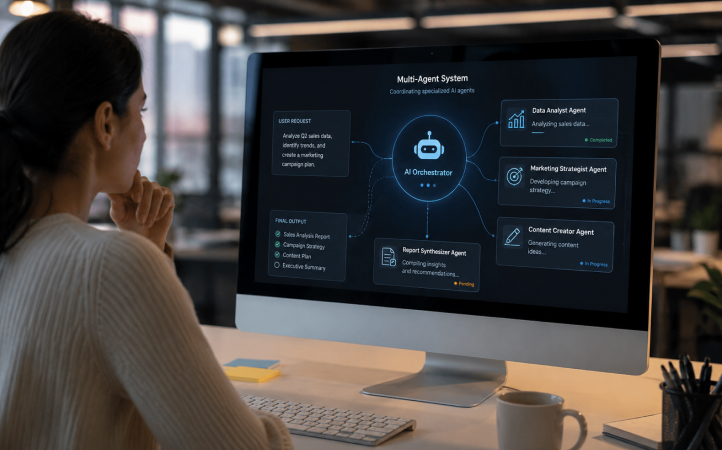
A multi-agent AI system (MAS) is an AI architecture in which multiple specialized AI agents work together, each handling a specific task, to achieve a shared goal on behalf of a user. This is like building a house: you cannot expect a single person to take care of laying the bricks, painting the walls, and installing lighting. You need a highly specialized expert for each task of the same project. The same goes for multi-agent systems.
LLM-based multi-agent systems become useful when a task is too complex for one agent to handle accurately. For example, if an agent has to choose between around 30–40 possible actions, including topics, tools, and connected agents, its routing accuracy can start to decline. Unlike individual AI agents, multi-agent systems are decentralized and rely on several agents operating in the same environment, where they can account for one another’s goals, memory, and next steps. They can exchange information directly or coordinate indirectly by changing the shared environment they operate in.

Graphic showing how a multi-agent system works
Step 1: Start with a business problem, not a technology
When you decide to implement multi-agent systems, you should start by looking at your business-specific use cases instead of focusing on the technology options. Ask yourself: Which complex challenges from recurring processes require complex automations to be overcome?
By choosing this approach, you ensure that the multi-agent system is designed to address specific needs and deliver practical value. This step also helps you to clarify which tasks should be delegated to agents, making the system more effective and relevant to organizational goals.
A practical example from the session of proMX Global Technology Director, Sebastian Sieber, at the proMX Project Operations + AI Summit 2026 shows why the starting point should always be a real business problem, not the technology itself.
Sebastian Sieber presents the business problem of a user who reports via email (Outlook) that an Asset Management application can no longer save changes. To address this issue, Sebastian demonstrates an agent-driven workflow that can:
- Read incoming requests
- Analyze and prioritize issues
- Create tickets
- Provision environments
- Deploy applications
- Run tests
- Generate reports
The example highlights how complex business processes often require more than a simple question-and-answer interaction. Instead, they involve multiple responsibilities, tools, and data sources working together toward a common goal.
A multi-agent architecture allows each of these responsibilities to be handled by a specialized agent, while a parent agent coordinates their work toward the same outcome.
Step 2: Break the process into specialized agents
Once you have defined which scenarios and tasks should be automated by a multi-agent AI system, you need to decide which specialized AI agents you need. Large language models (LLMs) enable AI agents to reason and make decisions, helping them interpret the request, understand the available context, and decide what should happen next. When talking about these agents, we make the distinction between child agents and connected agents:
- Child agents are best for smaller, tightly connected subtasks inside one larger solution.
- Connected agents are better when the agent should be reusable, independently managed, or governed separately.
In the demo example mentioned above, the first agent takes over the initial review of the incoming email. It identifies the core problem, extracts the relevant details about the bug in the Asset Management application, creates a ticket with an ID, and classifies the issue by severity. In Sebastian’s demo, this role is handled by the “Power Platform Review Agent”. Once this first analysis is complete, the result does not stay isolated. It becomes the input for the next step in the workflow, for example, for another agent that prepares a separate sandbox environment.
This is where the orchestrator, or parent agent, comes in: it does not complete every task itself, but coordinates the sequence of agents, passes the right information to the right agent, and ensures that each result moves the overall workflow forward. This orchestration is what allows humans to rely on the multi-agent system for execution while stepping in only for approvals, exceptions, or oversight.
If you are familiar with the Microsoft ecosystem, you might consider creating your agents on GitHub Copilot for software development (e.g., to solve a bug issue), Microsoft 365 Copilot for business productivity (e.g., to automate manual tasks from daily work), and Copilot Studio for more complex, autonomous, and organization-wide agents.
Step 3: Apply governance to each agent
When deciding on the agents for your workflow, you should also consider the governance implications behind each connection. This is important since each agent might run in a different environment than your parent agent and have different access to systems, records, or APIs that the parent agent doesn’t. With every new connection, you also extend the solution’s trust boundary, so it’s mandatory to choose appropriate data flows between agents and ensure that permissions, approvals, and security reviews are in place. By applying governance and audit controls to each agent you connect to your multi-agent system, you make sure that the entire system is safe and less prone to security breaches.
Step 4: Connect agents to the right tools
Apart from the security aspect, choosing the right tools for each agent is a must for a well-functioning AI agent network. Since each AI agent is only as effective as the data it can access, you should make sure it is connected to the tools that provide the information it needs to perform its tasks. It might sound logical, but as you grow your multi-agent system, having a good overview of all connections within each agent can be quite overwhelming.
In the demo example mentioned above, the agent can only work effectively because it has access to rich context from multiple enterprise data sources, including Outlook (emails and meetings), Dataverse business records, and other Microsoft 365 data accessible through Microsoft Graph (Work IQ).
The agent can then use execution tools to act on that context, for example:
- Power Platform CLI to manage Power Platform environments, solutions, and deployments.
- Playwright to automate browser-based testing and validate application behavior.
- Azure to provision, run, or connect supporting cloud services.
Step 5: Build agents that can adapt
If you have read through all the steps so far, you are already on a very good path to build effective multi-agent systems. However, the reality is that no single MAS is perfect: authentication problems, missing configurations, and unexpected validation errors occur frequently. That is the reason why AI agents need to be resilient to failure and have the following characteristics:
- Retry failed actions
- Consult documentation
- Adjust execution paths
- Fix configuration issues
This resilience is often what separates a useful enterprise-grade agent system from a simple automation script. Before using MAS, you should run some tests to see if the architecture that was created works: Are all agents useful, or are any missing? Does the orchestration of the workflow run smoothly, or do you spend too much time monitoring it? After successful implementation of the system, you can monitor the performance of the agents on a regular basis and optimize them when necessary.
Step 6: Scale with skills
Last but not least, you can scale multi-agent AI systems with skills. This feature allows users with no coding experience to define processes and instructions in natural language for agents to follow. In our demo, Sebastian explains that skills can document step-by-step processes (e.g., sales or operations), specifying responsibilities, tables, and actions, which agents and AI functionalities can access and execute.
Once defined, skills become reusable process documentation that AI-based functionalities can retrieve and use, streamlining process automation and context understanding. This makes it easier to reproduce similar actions in the future, without redesigning the entire multi-agent workflow from scratch, saving time and effort while improving process consistency.
Conclusion: How to build multi-agent AI systems
Now that you know which steps to follow, you have all the tools you need to turn your AI ambition into a business opportunity. By creating multi-agent AI systems, you can automate and delegate tasks to intelligent agents, each designed to conclude a fraction of a bigger task that cannot be handled by a single agent.
If you are already familiar with Microsoft technologies such as GitHub Copilot, Power Platform, Copilot Studio, and Azure, you already have the foundation to start building multi-agent systems today.
Contact proMX experts to start your own AI transformation journey.
FAQ
When should teams use multi-agent systems?
Teams should use multi-agent systems when one agent cannot handle a task that is too complex to route accurately on its own. As a practical rule of thumb, this can happen when an agent reaches around 30–40 possible actions, such as topics, tools, or connected agents. This is not a fixed limit, so teams should validate it against their own use cases and evaluations.
What is the difference between a child agent and a connected agent?
Think of a child agent as a specialist that works within a larger AI solution, handling a specific task as part of the overall workflow. A connected agent, on the other hand, operates more independently and can be reused across different solutions or managed by separate teams.
How to scale multi-agent systems?
Multi-agent systems scale best when you standardize reusable skills, connect agents to the right tools, and establish governance early. This allows specialized agents to work consistently across more business processes while remaining reliable, secure, and aligned with organizational goals.

RECENT POST
OUR EVENTS