




Reinvent your productivity with Microsoft Dynamics 365 Field Service

Simplified processes
Less paperwork, simplified coordination, improved communication with technicians and customers are some results of process optimization. You also save both money and time with mobile apps and Connected Field Service.

Productive service
Comprehensive information about customers and their service history and equipped with the right tools and parts, your technicians will be able to work more efficiently on-site, significantly improving your first-time fix rate.

Satisfied customers
Customers demand and depend upon reliability from their service providers. Better planning, fewer on-site-service visits and fewer interruptions of operations improve the service experience enormously and boost satisfaction.
Your benefits

Dynamics 365 Field Service is rightfully called revolutionary. Besides optimizing your existing processes, connecting the app to IoT also allows you to fix problems before the customer detects them. Unanticipated costly interruptions of operations are thus a thing of the past. For help with implementation turn to proMX and benefit from the experience of a renowned Dynamics Partner to make your service organization profitable.
Microsoft Dynamics 365 Field Service includes:

Informative work orders
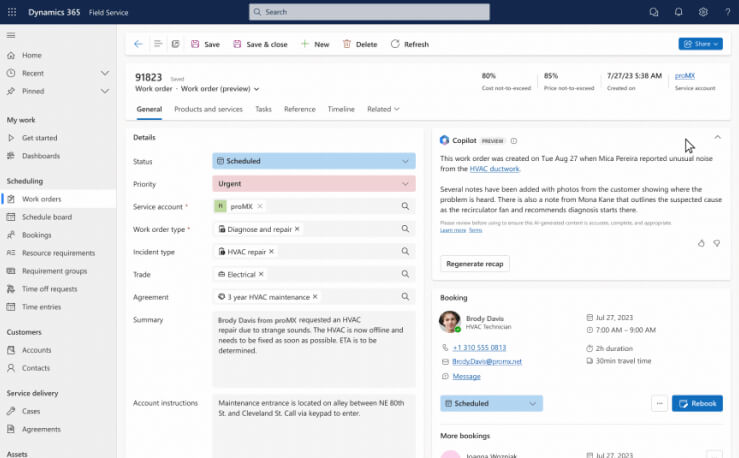
A work order informs about the nature of the work that needs to be done, so resources and activities can be coordinated accordingly. It contains information such as status, estimated completion time, priority level and customer details. Additionally, a work order can be allocated to an incident type, like an installation or a repair job. Categorized like this, technicians can access further materials like knowledge articles.

Intuitive resource management
The Schedule Board and the corresponding map enable dispatchers to schedule resources in the most logical way. All current jobs, their status as well as the field service agents’ timetables are displayed. Dispatchers can simply assign jobs by dragging a pin from the map and dropping it on a resource’s timetable. Unforeseen absences of employees can easily be reassigned to available resources, too.

Automated scheduling
Urgent tasks are scheduled and assigned to the best and most available resource automatically. For example, if the connected IoT sensors of an asset on customer site trigger an alert, the system generates a new work order. This, in turn, is assigned to a free employee with the needed qualifications. Furthermore, Dynamics 365 Field Service includes a set of automated capabilities to optimize resource scheduling.

Asset tracking
Field service work often involves the installation or repair of assets on customer site. Dynamics 365 Field Service lets you record any asset’s history, e.g., when was it installed, when repaired. You can also see where exactly an item is in place, meaning the level or room number of the building in addition to its address. Inventory stored in warehouses or cars can also be tracked to make sure stock is reordered timely and distributed to the service cars as needed.

Simplified invoicing
For every work order all available details are neatly recorded. Project managers can check which products were used, how many hours of work and which travel expenses are charged. When a job is finished, and the customer is satisfied, its status can be changed to trigger the creation of an invoice.

Mobile App
The Dynamics 365 Field Service Mobile App supports technicians before, during and after their jobs. Details about the customer, the asset in question and the task help them to prepare. During the job the technician can consult check lists and 3D-models or add images, videos or text to a timeline to document their doings. After completion, customers can sign digitally, and job reports can be generated. It is even possible to note in the app, if a competitor was on the job site. The mobile app is available online and offline.
Support field service with AI
With critical frontline tasks in one central place, and lengthy data-entry processes out of the way thanks to Copilot, you’ll be able to deliver your services faster.
-

Accelerating service delivery: Synch your work orders with Microsoft Outlook and let Copilot help you summarize customer escalations, offer data-driven recommendations based on activity or skill- set, and give you the gist of key details and next steps.
-

Boosting technician productivity: View important work order details on the go with the Dynamics 365 Field Service mobile experience for frontline technicians.
-

Streamlining work order management: Access concise information about the work order, including intelligent recaps, relevant next steps, and more, and gain important information at the outset.

Stay up to date on work orders without navigating through excess information using the intelligent recaps feature.
-

Personalizing service experiences: Copilot’s AI capabilities empower service managers to work with Dynamics 365 Field Service features directly in Outlook and Teams, making information readily available.
-

Helping frontline technicians work more efficiently: Copilot provides technicians with a clear understanding of the problem, and of all tools needed for a maintenance visit or repair.
-

Optimizing service operations: Customers profit from timeliness, and quick and efficient solutions to their problems thanks to Field Service’s powerful scheduling engine.
The Predictive work duration feature learns from historical booking information and completion times. Factors like past resource performance, the customer, and the type of work will give you an idea of a more realistic duration.
-

Work duration and resource proficiency suggestions: Analyzing historical data on work order duration will help you improve overall scheduling efficiency.
-

Incident type suggestions: Based on a review of work order data, you’ll get suggestions on which items to include on incident types.
-

IoT Alert suggestions: Receive automatic priority and incident type suggestions directly in your Dynamics 365 Field Service app.

Field Service revolution

To keep field service costs low and to achieve maximum efficiency, good planning is critical. Get support in this effort and use automatic scheduling, which takes skills, starting location and optimal capacity of your technicians into account. Or plan assignments in an interactive view via drag-and-drop. Use integrated inventory management which tracks tools and parts in warehouses or vehicles in real time to guarantee that your technicians are equipped with everything they need on-site.


Efficient field service with the right software
Find out how a solution for field service management will help you overcome challenges in field service and how you and your customers will benefit from it. Learn about concrete advantages of the Microsoft solution Dynamics 365 Field Service in the included case study of one of our customers.

Leave a message and they will get in touch with you
proMX - YOUR MICROSOFT DYNAMICS 365 PARTNER
Since proMX’s founding over 20 years ago, we have grown both from a geographical and a technical perspective: today we are an international organization with subsidiaries in the USA, Europe and Asia and we are experts for Microsoft Dynamics 365. We were one of the first to realize a project with Dynamics 365 Field Service when the solution was just entering the market. Together with other Dynamics 365 technologies, we implemented it successfully at the professional services company Interflex – and at more organizations worldwide since.
Whether small, medium or large organizations – we always provide the best possible working environment to our customers. That is why we implement and customize Dynamics 365 solutions as well as develop our own add-ons to extend Dynamics 365 with even more useful features.





Our services

Consulting
We will show you how Dynamics 365 Field Service will support you in your daily business. Together we will then establish an implementation plan based on your vision and possibilities.
It includes technical and industry-specific prerequisites as well as security and compliance requirements.
We’ll teach all users the best way to use Dynamics 365 Field Service before its go-live.

System integration
The implementation plan will serve us as guidelines when we customize the field service tool to your needs. The actual implementation will be carried out in agile sprints. That allows you to check every step and lets us adapt the solution along the way if necessary.
Our experts will embed Dynamics 365 Field Service in your existing systems. Further Microsoft applications or proMX add-ons can be integrated seamlessly, too.

Infrastructure
All Dynamics 365 solutions run in the cloud. That means you needn’t worry about physical servers in your buildings. All solutions are available on-premises, too, if you prefer.
The security of your data and processes is also ensured. All your systems are secured by multi-factor authentication. Employees can only access designated areas with proof of identity, e.g., a password and a code sent to their phones.

Support
Do you have further questions or problems? Don’t worry, we won’t leave you hanging.
No matter whether there is a technical issue, or you need advice on navigating your new solution: our support team is available for you.
Combine with these products

IoT & Machine Learning

Sales

Customer Service

Dynamics 365 Project Service Automation
Frequently asked questions
I'm here to help!

Find out how we can help transform your business with
Microsoft Dynamics 365 and proMX apps.
