What’s new in the proMX 365 Productivity Suite? – Q1/2025 release highlights
The Q1/2025 release of the proMX 365 Productivity Suite delivers new features, usability enhancements and important bug fixes for proMX 365 Project Portfolio Management, proMX 365 Absence Management, proMX 365 Time Tracking and proMX 365 Mobile Time Tracking. These latest updates are based on valuable feedback from both our users and internal teams.
New features in proMX 365 Project Portfolio Management
Financial View
With the Q1/2025 release, a new Financial View has been added to proMX 365 Project Portfolio Management. It offers a clear comparison of estimated versus actual values across portfolios, programs and projects. This view displays key financial data such as budget, sales, costs and forecasts.
Users can select which financial metric they want to view, and depending on the selection, different figures are displayed. When multiple values apply (for example sales and cost), the data appears stacked (each on its own line with a small indicator to distinguish them). This format keeps the information compact and easy to interpret.
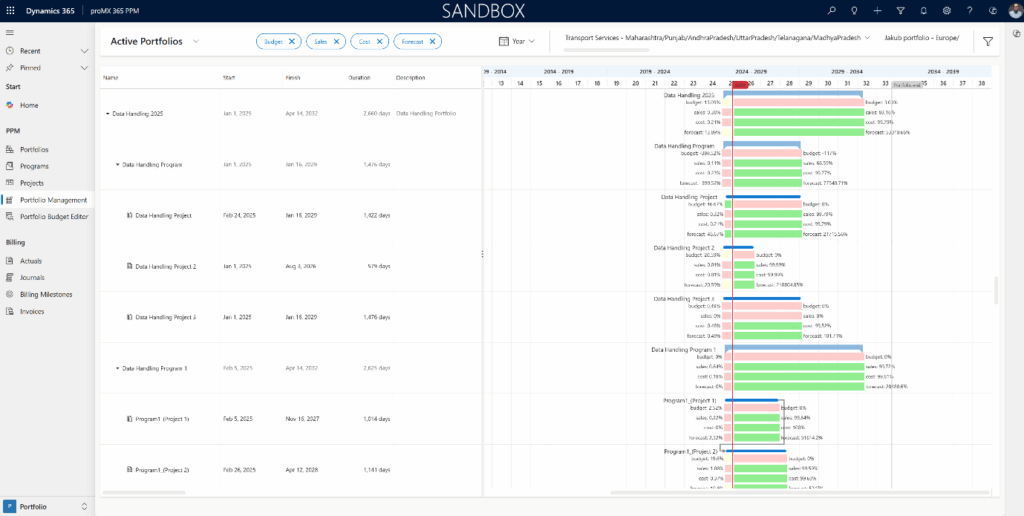
Financial data is now split into two categories: actual and estimation. The system uses the current date to determine the split: everything up to today is considered actual, while all future values are shown as estimations.
To improve the user interface, colorful backgrounds highlight percentage values. They help users quickly spot trends and deviations.
| Benefits: This new Financial View provides greater transparency and control over project finances by clearly separating actuals from forecasts and offering visual cues. |
Comparison options
The Financial View also supports side-by-side comparisons. When activated during a comparison, it displays the live situation on top, and a selected baseline or scenario on the bottom.

| Benefits: This allows users to evaluate live performance against baseline and scenario plans directly within the same interface, making it easier to track progress and make informed decisions. |
Issue tracking and risk management
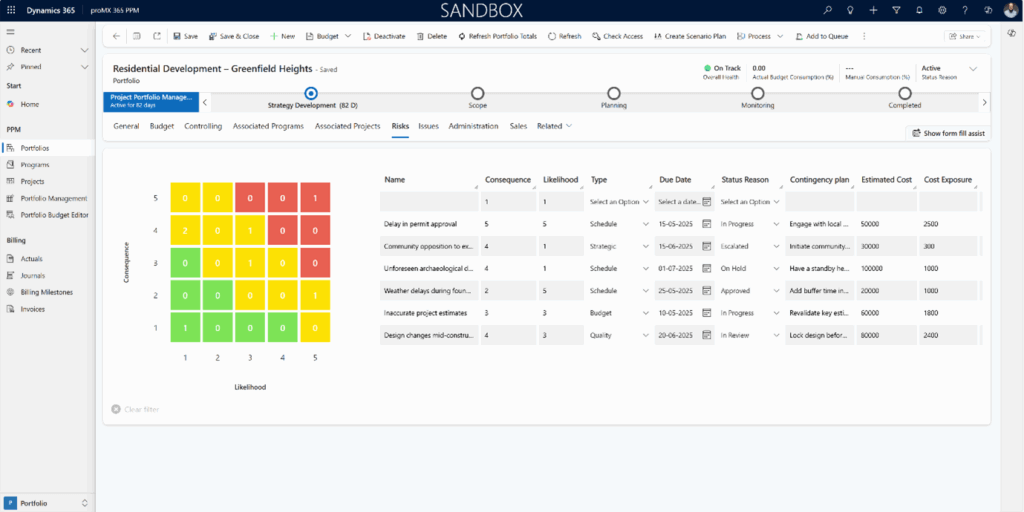
Issue tracking and risk management are now enabled at both portfolio and program levels.
A budget editor
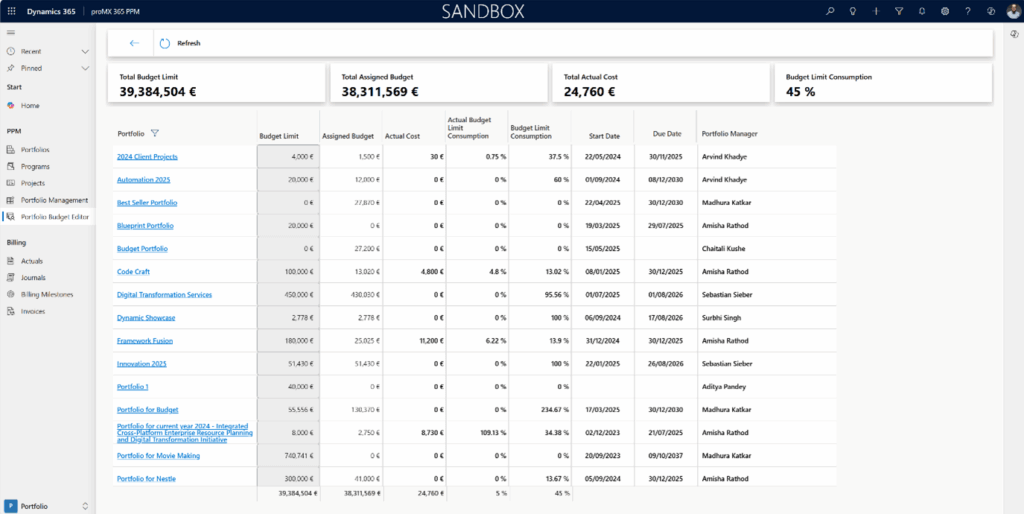
A budget editor is available on top of all portfolios, providing a clear financial overview of all portfolio budgets on one screen.
Nested grids
Nested grids have been added to portfolios and programs, and portfolios or programs are now linked to Quotes and/or Project Contracts.
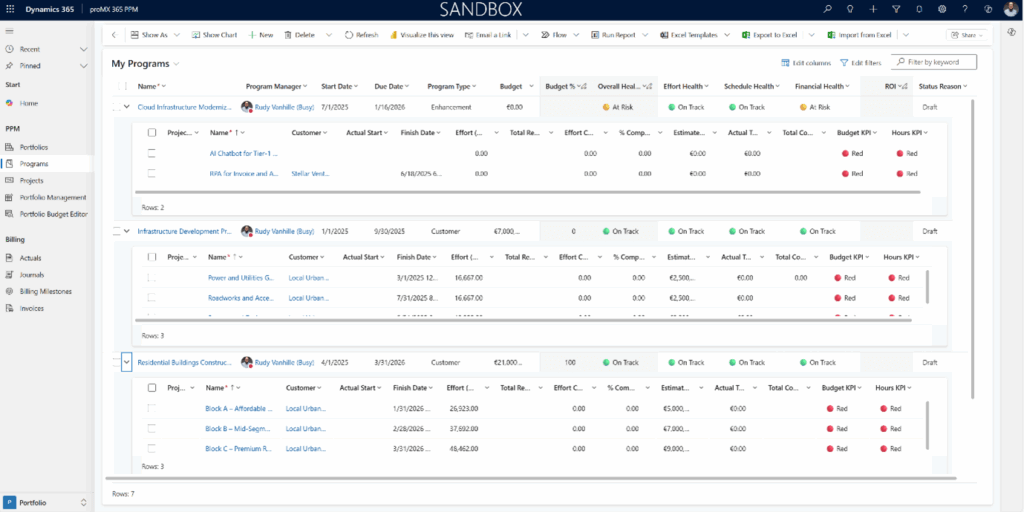
| Benefits: The new budget editor and nested grids make it easier for teams to identify, assess and update project risks. Manage them more proactively and efficiently. |
Enhancements to proMX 365 Absence Management
The Q1/2025 release introduces new ways to view and manage absences across the organization with updates to the Company View and Management View in the Holiday Requests Calendar. This release also introduces the concept of School Holidays, helping organizations account for regional or national academic schedules.


The Management view and the company view now displays bookable resources grouped by their organizational unit, giving managers better oversight of team availability. Grouping is turned on by default, but can be toggled off if needed.
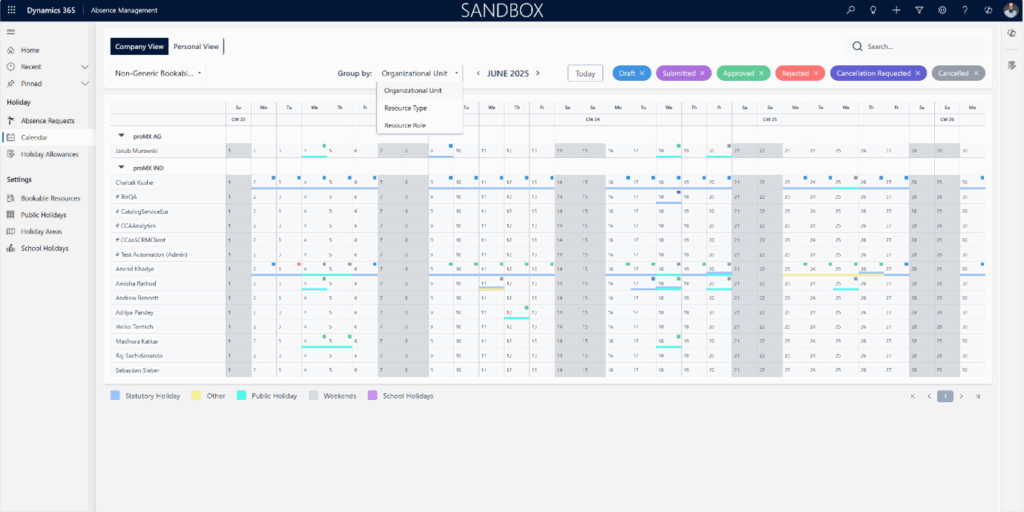
For broader visibility, the Company View offers a central dashboard for tracking absences company wide, and a new “Group By” filter has been added to both views. Users can now group records by:
- Organizational Unit (default)
- Resource Type
- Resource Role
This filter makes it easier to customize the calendar based on what’s most relevant to your team or department. Additionally, the calendar has been redesigned for improved clarity, making it easier to distinguish different absence types on the same day.
| Benefits: These improvements give managers and HR teams greater visibility and control over team availability by offering flexible grouping options and centralized views. |
Overall, the Q1/2025 updates help teams gain clearer insights, manage risks more effectively and streamline absence management. If you have any additional feedback, make sure to reach out to proMX!
RECENT POST
OUR EVENTS