
How Microsoft Power Pages is modernizing work-order portals for energy and utility companies
Content
Highlights
- Work‑order portals eliminate the organizational chaos caused by scattered spreadsheets, long email chains, and a lack of process visibility – especially in time‑critical outage scenarios.
- Utilities gain clear, end‑to‑end processes by making data centrally accessible, reducing media disruptions, and enabling internal and external stakeholders to work within a unified workflow.
- Modern portals require robust foundational capabilities such as consistent role management, audit‑proof documentation, defined milestones, and transparent work‑order overviews.
- Microsoft Power Pages provides the technological backbone to securely connect work orders, ERP data, and Dynamics 365 processes while seamlessly integrating external partners.
- The benefits are measurable: shorter cycle times, fewer emails, more complete documentation, and higher process quality through regular portal usage.
The day has barely begun when the operations control center reports an outage. For many energy and utilities companies, this is when a complex – and often chaotic – process kicks off. Multiple teams access different pieces of information, but rarely the same ones. Spreadsheets appear in several versions at once, emails circulate across large distribution lists, and service contractors wait for answers while internal teams are still coordinating.
Yet this is exactly when a unified, traceable process would make the biggest difference. Imagine the same situation supported by a centralized portal: A work order is created and automatically enriched with context data. Milestones become visible, documents are version‑controlled, and both internal and external teams collaborate seamlessly.
Work‑order portals give utilities the ability to manage complex infrastructure processes efficiently, transparently, and predictably – and that’s what this article is all about.
From data chaos to clear processes
Many utilities share similar challenges: project information spread across Excel files, coordination via lengthy email threads, and no centralized access point for external contractors to view documents or submit status updates. This leads to delays, higher risks, and significant administrative burden.
A portal brings transparency. It centralizes critical data, eliminates media gaps, and ensures everyone operates from the same understanding – the foundation for executing work‑order and infrastructure processes faster and more reliably.
What modern portals for utilities must deliver
A modern portal is far more than a digital noticeboard. Utilities need solutions that support real operational workflows:
- A consistent role and permission model
- Audit‑proof documentation
- Clearly defined workflows with milestones, upload points, and approvals
- Transparent overviews of all ongoing work orders – both internal and external
With rotating contractors, construction partners, and technical specialists, this is indispensable. A portal becomes an operational tool that actively supports quality, safety, and compliance.
Microsoft Power Pages as the technological bridge
Power Pages extends the Microsoft Power Platform with a secure, externally accessible web portal. For utilities, this means: fast adaptability, low development overhead, and strong integration with existing systems.
All data lives in Microsoft Dataverse, the same data foundation that powers Dynamics 365. Work orders, project details, and documents can be exchanged in real time. Dynamics 365 Project Operations, for example, can serve as the central work‑order and project management system. The portal becomes the bridge between internal systems and external partners.
The architecture of a high‑performance utility portal
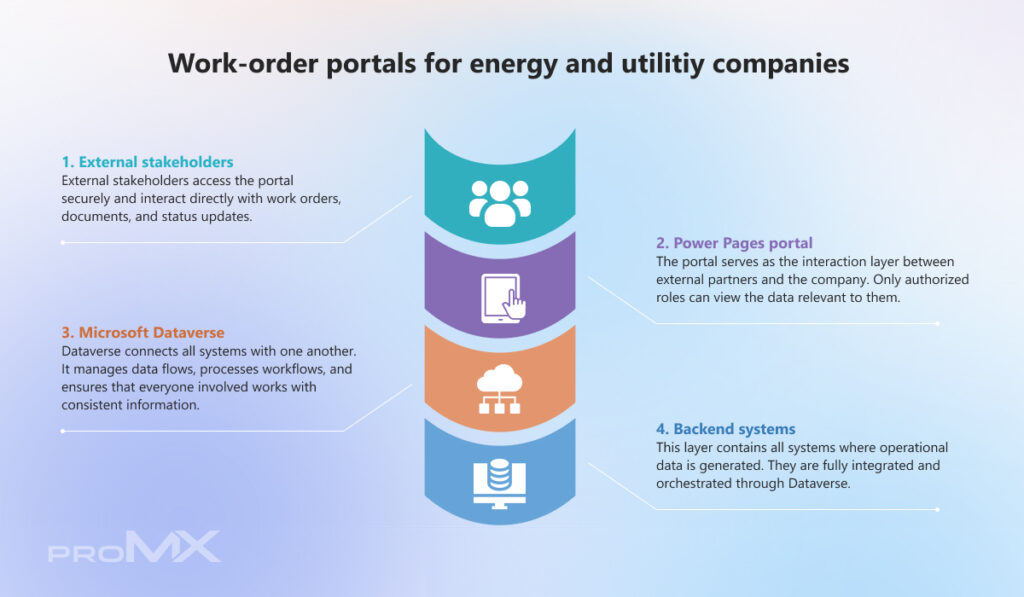
A typical work‑order portal for utilities relies on a combination of backend systems, a centralized data platform, and a secure portal layer. It connects Dynamics 365 modules, ERP data, and external stakeholders through a Power Pages portal.
Secure access is provided through Microsoft Entra External ID, while Dataverse functions as the data hub managing workflows, synchronization, and document flows.
The visualization illustrates how these components work together to create a seamless, secure, and scalable process landscape.
Where work‑order portals deliver the greatest impact
Work‑order portals are especially powerful in scenarios involving multiple external stakeholders. Common use cases include:
- Viewing and updating work orders
- Uploading technical documentation and certificates
- Confirming milestones
- Onboarding new partners or suppliers
- Providing a central communication layer for large infrastructure projects
proMX’s customer project experience shows that when ERP data and Dynamics 365 workflows flow into a single portal, external partners get structured, secure access to the information they actually need – improving collaboration quality and overall process speed.
The most important KPIs
How well did the portal reduce media breaks and standardize workflows? Relevant KPIs include:
- Shorter work‑order throughput times
- Significant reduction in email communication
- More complete documentation
- Regular portal usage by external partners (logins, uploads, status updates)
Conclusion: Now is the right time to implement a portal
Work‑order portals are the operational backbone for activities essential to the utilities sector: maintaining infrastructure, delivering projects, coordinating external contractors, and ensuring compliance.
With Power Pages, utilities gain a tool that digitizes these workflows as well as structures, accelerates, and makes them fully auditable. It replaces email‑driven processes with unified, secure workflows – exactly what the industry needs moving forward.
Want to see how a work‑order portal could look for your utility? Let’s identify which processes will deliver the highest ROI and how Power Pages can support them.
Get expert guidance or request a demo today!
Frequently Asked Questions (FAQ)
1. How is a work‑order portal different from a traditional customer portal?
A traditional customer portal is usually designed to provide information and support simple service requests. A work‑order portal, on the other hand, is an operational work tool: it represents concrete work orders, technical documents, milestones, approvals, and the interaction with external service providers.
This focus is especially critical in the energy and utilities sector, where safety‑related processes, regulatory requirements, and technical documentation obligations play a central role.
2. Can I continue using my existing ERP or older work‑order tools?
Yes. Power Pages is not a replacement but an additional access layer. Operational data remains in systems like your ERP or Dynamics 365 Project Operations. The portal offers an intuitive interface for external partners, while internal workflows and data governance stay intact.
3. How complex is it to get started with a portal project?
The effort primarily depends on the scope of your processes, not on the technology. Many energy companies begin with an MVP portal that includes core functions such as work‑order overviews, document uploads, and status updates. Thanks to the low‑code foundation of Power Pages, additional features can be implemented quickly.
What matters most is a clear scope: Which data should be visible to external users? Which stakeholders access what, and in which way? What security requirements must be met? With these cornerstones in place, you can build a portal in a structured way – and expand it later as needed.



RECENT POST
OUR EVENTS