Updated resource planning in proMX 365 PPM as another step to confident project delivery
Content
For a project-driven organization, resource planning is one of the most important and challenging tasks. There are too many variables to keep in mind at all times: resources, tasks, dependencies, constraints, effort, and constantly changing timelines. In this environment, a single change ripples through an entire project or portfolio.
With the latest enhancements to the proMX 365 Project Portfolio Management (PPM) solution, we are introducing a new generation of resource planning and resource utilization capabilities. The tool is tightly integrated with Microsoft Dynamics 365 Project Operations, yet powerful enough to handle the complexity of real-world scenarios.
In this article, we are going to talk about what’s new in the Project Portfolio Management app, what value it brings, and how it changes the way organizations plan, assign, and optimize their resources.
What does proMX 365 PPM have that traditional resource planning doesn’t?
First and foremost, let us take a closer look at traditional resource planning. What comes to mind when you think of it?
| Traditional planning | Consequences |
| Static plans | Resource bottlenecks appear too late |
| Spreadsheet-based capacity views | Dependencies and constraints break timelines unexpectedly |
| Manual task assignments | Overallocation and underutilization coexist |
| Isolated project schedules | Project managers spend more time explaining plans than improving them |
Even though the traditional approach has worked for years and decades, it doesn’t mean it’s optimal for today’s reality. As the world is getting increasingly hectic, the traditional ways are falling behind.
What’s new in proMX 365 PPM?
In order to make resource planning more flexible and change-responsive, tasks, resources, effort, availability, and dependencies should be calculated together, not in isolation. That’s exactly where the new proMX 365 PPM capabilities come in.
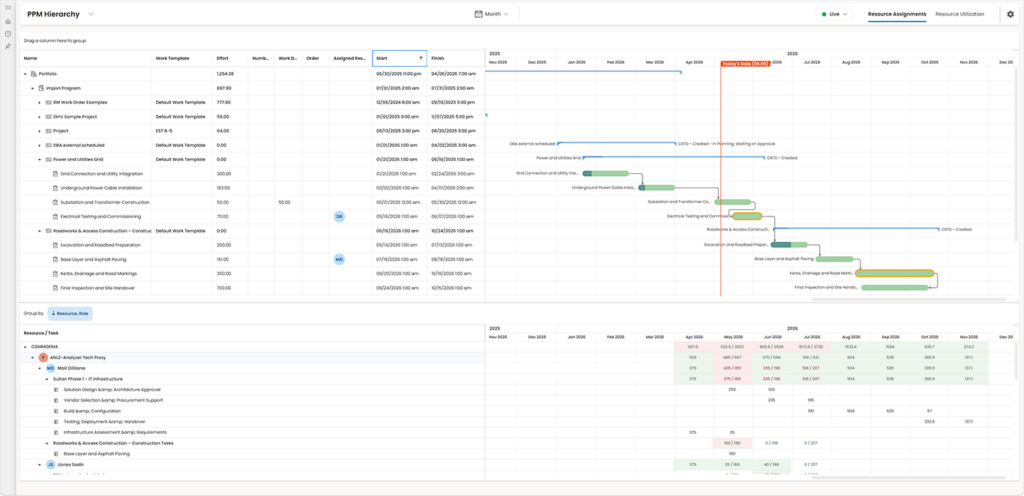
One planning view across portfolio, program, project, tasks and subtasks
At the core of proMX 365 PPM is a configurable hierarchical planning structure, which defines how data is calculated and rolled up: Portfolios → Programs → Projects → Project tasks → Subtasks.
In a single screen, project managers can:
- See tasks in a structured table
- Adjust dates, durations, and values inline
- Instantly visualize the impact in a synchronized Gantt chart
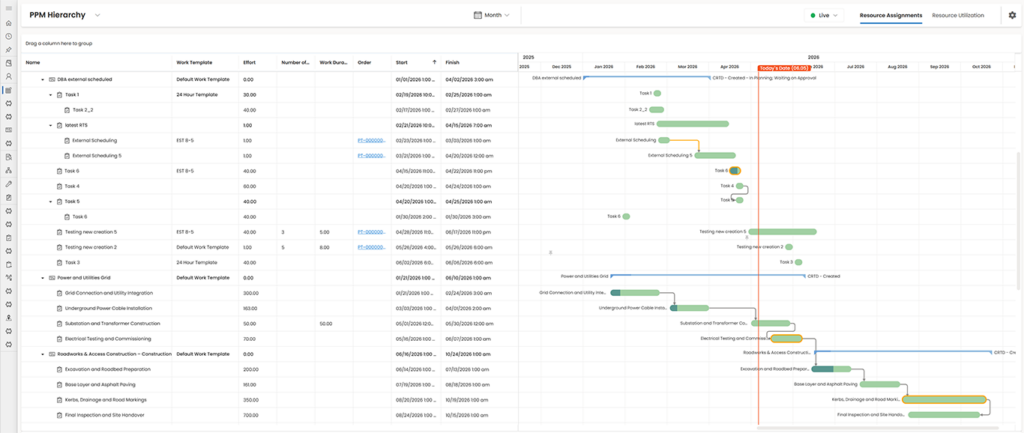
Note: Parent records (projects, programs, portfolios) automatically reflect the timelines of their underlying tasks, providing PMOs and leadership with an immediate, aggregated view.

Resource assignments that reflect reality
Whatever the objective of a project is, a one-person effort can rarely suffice. That is why proMX 365 PPM takes teamwork seriously:
| Aspect | Details |
| Core concept | Multiple resources can contribute to a single task |
| Assignment model | – Multiple resources per task – Each assignment creates its own resource assignment record |
| Effort calculation | Assigned hours calculated per resource, per day |
| Supported scenarios | – Shared workload across specialists – Parallel execution to reduce duration – Gradual ramp-up or ramp-down of effort |
| Outcome | Realistic and flexible resource planning aligned with actual team dynamics |


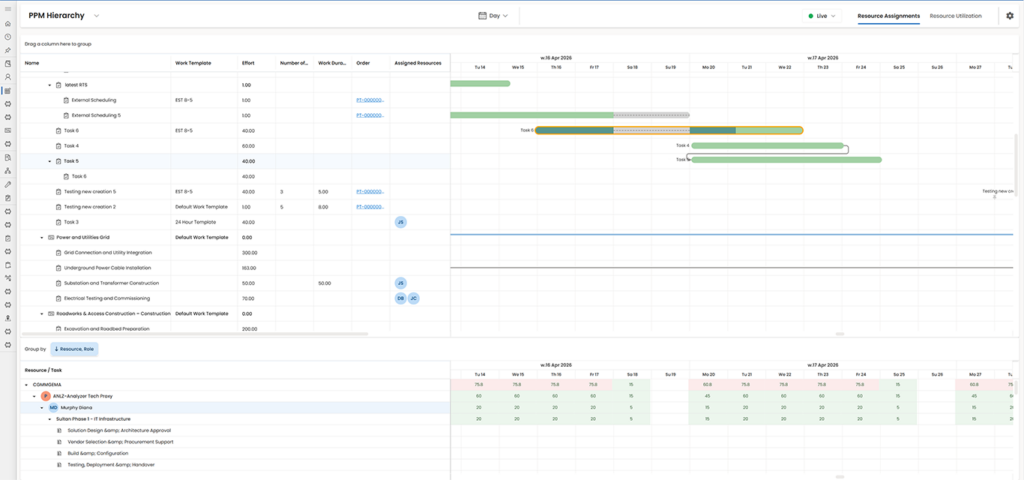
Intelligent effort distribution (work contours)
Resource planning is not just about who, but also about how much and when.
| Aspect | Details |
| Core concept | Planning considers not just who works, but how much and when |
| Assignment model | – Planned effort – Daily distribution of hours – Alignment with resource working calendar |
| Calendar awareness | – Public holidays automatically respected – Days off excluded – Partial availability adjusts effort |
| Calculation engine | Managed automatically by Project Operations internal scheduling engine or proMX scheduling engine (no manual calculations) |
| Outcome | Accurate, calendar-aware effort planning with minimal manual effort. For example, a 5-day task with an 8-hour calendar automatically transforms into 40 planned hours |
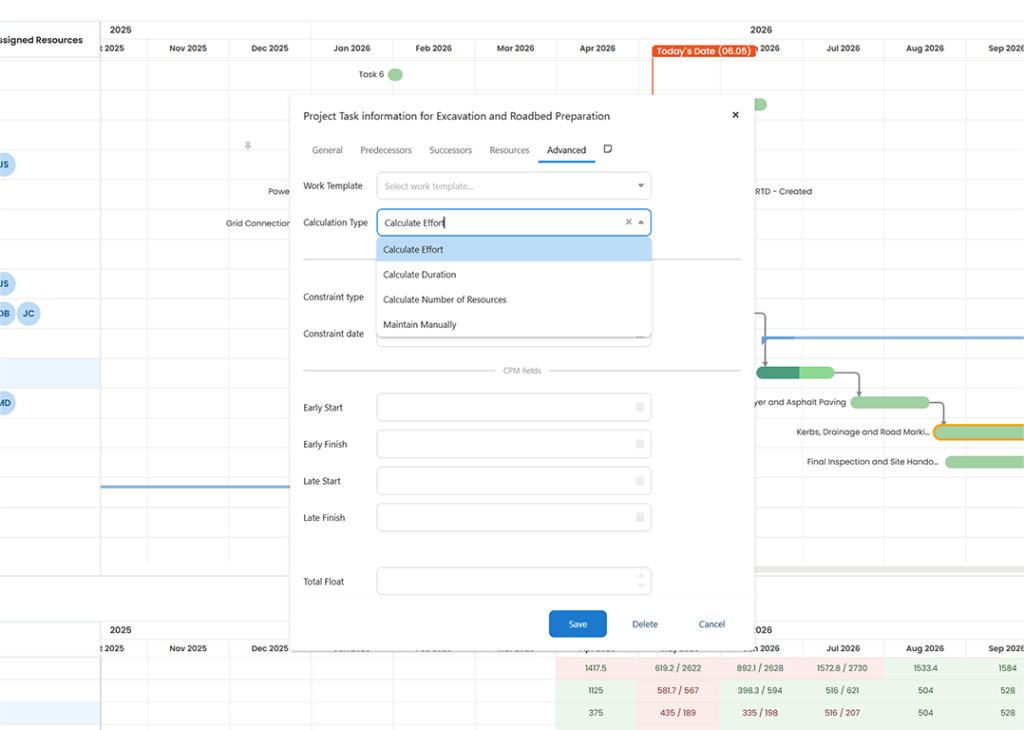
Flexible calculation logic
| Aspect | Details |
| Core concept | Different projects require different planning approaches |
| Available modes | – Calculate Duration → Adding resources shortens timeline – Calculate Effort → Duration fixed, effort increases – Calculate Number of Resources → Determines required staffing – Manual Calculation → Full control |
| Use cases | Fixed deadlines, budgets, and scope scenarios |
| Outcome | Highly adaptable planning logic tailored to project constraints |
Dependency-aware planning
| Aspect | Details |
| Supported dependencies | – Finish-to-Start – Start-to-Start – Finish-to-Finish – Lag and lead times |
| Automatic behavior | Moving a task shifts successor tasks automatically |
| Outcome | Transparent, controlled, and predictable scheduling even in complex structures |

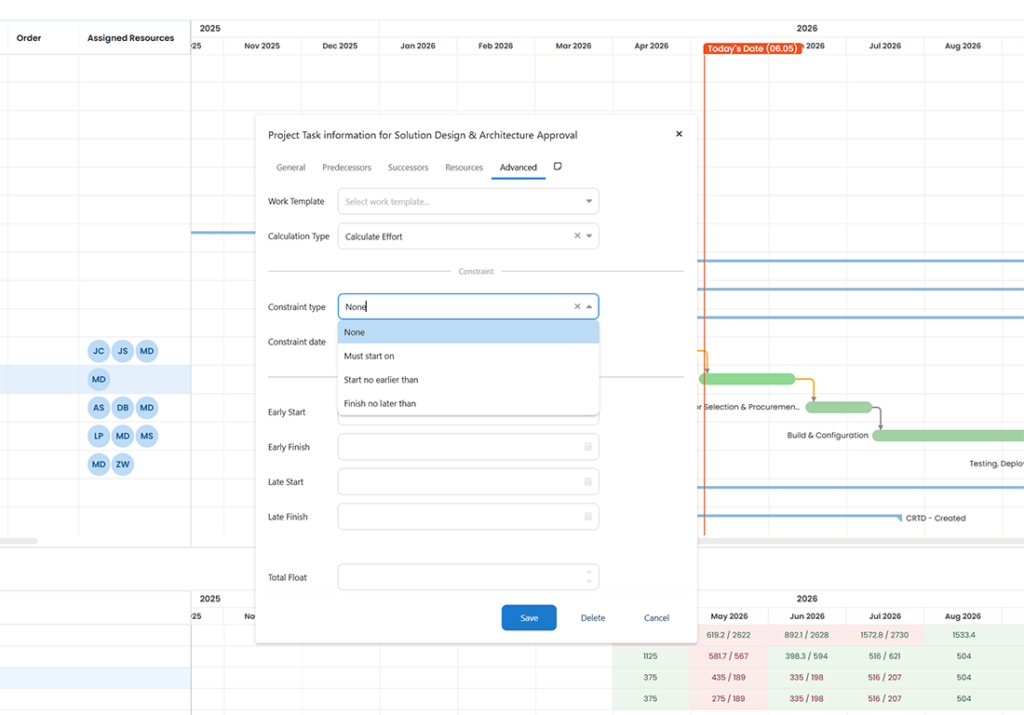
Constraint handling
| Project Operations | proMX 365 Project Portfolio Management |
| Does not support task constraints. Changes to one task automatically cascade to all related tasks and milestones. | – Supports deadline dates, previously delivered as part of our implementations. – Additional constraint handling can be configured; currently four constraint categories are implemented. – Available constraint types include Must Start/Finish On, No Earlier/Later Than, ASAP/ALAP. – Additional constraint types used in desktop Project can be added through configuration. |
Built-in critical path management
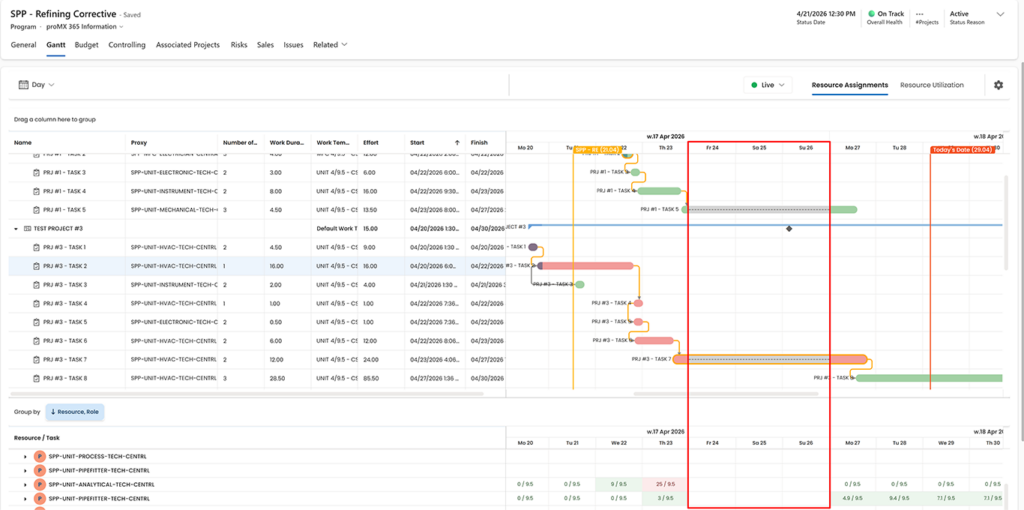
Knowing which tasks matter most is just as important as knowing who is available. Therefore, PPM has a built-in critical path management, which is a sequence of milestones with zero slack across a project or portfolio.
| Aspect | Details |
| Core concept | Identifies tasks that directly impact project completion |
| Calculated metrics | – Early start / finish – Late start / finish – Total float (slack) |
| Visualization | Critical path tasks clearly highlighted |
| Benefits for PMs | – Focus on high-impact tasks – Understand effect of delays or resource changes – Prioritize decisions confidently |
| Outcome | Improved risk awareness and delivery reliability |
Milestones
| Aspect | Details |
| Core concept | Structured milestone management that defines, baselines, and tracks key delivery dates |
| Trend & change tracking | – Every forecast change logged over time (Milestone Trend Analysis) – Visibility into schedule drift and recurring delays – Comparison of baseline vs. forecast vs. actual dates |
| Alerts & escalation | – Automated alerts when milestone deviations exceed defined thresholds – Severity‑based prioritization – Optional escalation for critical milestones |
| Portfolio awareness | – Cross‑project milestone chains connect dependencies across initiatives – Portfolio‑level visibility into critical delivery paths – Clear insight into ripple effects of delays |
| Outcome | Proactive control of critical delivery dates, early risk detection, and improved reliability of project and portfolio commitments |
Resource utilization
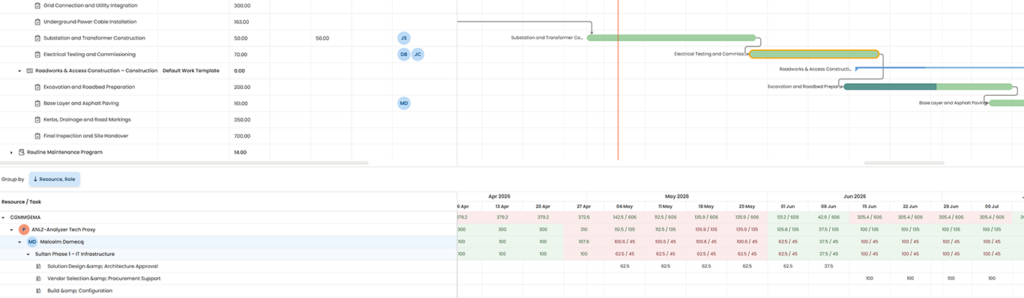
Below the Gantt view, proMX 365 PPM introduces a powerful resource utilization component.
| Aspect | Details |
| Visibility levels | – Organizational units – Business units – Resource proxies (role-based groups) – Individual resources |
| Tracked metrics | Assigned hours vs. available hours per day |
| Insights Provided | – Current allocation per resource – Remaining capacity – Overloads and gaps |
| Outcome | Full organizational capacity transparency for better planning decisions |
Drag-and-drop resource assignment
Assigning resources is no longer a separate planning exercise and can be:
- Dragged directly onto tasks
- Automatically assigned for the full task duration
- Calculated based on availability and calendars
This dramatically reduces planning effort while increasing accuracy.
Visual progress tracking
| Aspect | Details |
| Core concept | Tasks visualize both timeline and performance |
| Displayed metrics | – Total effort – Earned (completed) hours – Remaining hours |
| Insights | – Detect when effort is consumed faster than expected – Identify tasks that appear “on schedule” but underdeliver – Reveal hidden issues behind completion percentages |
| Outcome | More accurate progress tracking and early issue detection |

Historical resource snapshots
One of the most powerful and often overlooked features is historical snapshots that allows you to basically learn from the past experiences:
| Aspect | Details |
| Core capability | Automatic capture and storage of planning and resource data over time |
| Data capture | – Daily snapshots of planning data – Resource allocation and utilization data recorded automatically |
| Storage | Snapshots are stored for historical comparison and analysis |
| Analysis scope | – Scope evolution – Resource allocation changes – Timeline shifts and adjustments |
| Use cases | – Governance and reporting – Audit support – Retrospectives and lessons learned |
| Outcome | Transforms resource planning from a static process into a continuous learning system |


Conclusion
Modern project delivery requires resource planning that reflects reality. The latest enhancements in proMX 365 Project Portfolio Management bring tasks, dependencies, effort, availability, and utilization together in one consistent planning experience. Instead of reacting to bottlenecks and conflicts after the fact, you can anticipate impacts, balance workloads proactively, and focus their attention where it matters most.
Not sure if our solution is what you’re looking for and if proMX is the right partner to go through your company’s digital transformation with? Contact us, and we’ll happily prepare a tailored demo version for you.
RECENT POST
OUR EVENTS