

Beyond project management boundaries with the proMX 365 PMO Assistant (BOB)
Content
Modern project delivery often resembles a high‑wire act. You are supposed to balance resources, tasks, dependencies, budget, constraints and constantly shifting timelines. Moreover, you have to do it all simultaneously. Even with sophisticated tools, a single change can influence an entire portfolio. To help project‑driven organizations stay ahead of these complexities, we introduce BOB, the proMX 365 PMO Assistant. BOB stands for Beyond Our Boundaries, reflecting its ambition to push project management beyond traditional limits.
In this article, we will talk about what proMX 365 PMO Assistant is, how it works, its features, and what use cases it is most suitable for.
Highlights
- Multi-agent AI architecture
- Front-end agnostic experience
- Natural language interaction
- Configurable framework
- Advanced impact analysis
- Real-time portfolio intelligence
Who, or rather, what is BOB?
Let’s not forget our manners and get properly acquainted with BOB first. It is a multi‑agent, AI‑powered assistant designed for organizations using Dynamics 365 Project Operations.
What makes it different from single‑agent copilots? It is able to orchestrate eleven specialized agents, each focused on a specific domain such as portfolio, project, financial, account or resource management. A dedicated twelfth orchestrator agent analyzes the user’s intent and routes questions to the appropriate specialist. This architecture makes proMX 365 PMO Assistant act like a project manager with a team of multiple copilots, coordinating specialized agents to handle complex questions and ensure answers come from the right expert.
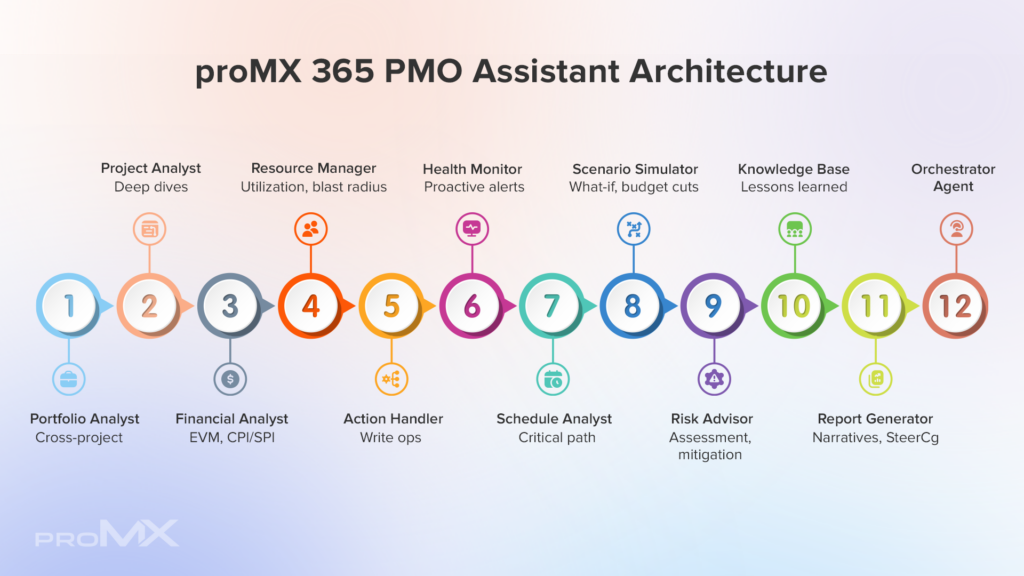
How does proMX 365 PMO Assistant (BOB) work?
Interacting with proMX 365 PMO Assistant feels natural. You can type or speak a question using the device of choice. The orchestrator agent interprets the intent, clarifies ambiguities, and delegates the task to one or several specialist agents. Instead of just generating text, the assistant can also provide voice responses, making it useful when you are on the go or prefer listening over reading. Behind the scenes, this multi-agent tool connects to selected data sources (such as Dataverse, or other structured repositories) and uses the configured large‑language model to reason over the data.
Key features and use cases at a glance
The capabilities of proMX 365 PMO Assistant extend beyond simple chat-like experience. Here are some of the core features and how they translate into practical use cases:
| Contextual intelligence | |
| Natural language understanding | The orchestrator agent interprets incomplete or ambiguous queries, ensuring the right specialist responds even when users are being vague. |
| Conversation memory | Questions build on each other so that follow‑up queries remain in context. |
| Clarification prompts | When essential details are missing, BOB helps users refine their request rather than returning irrelevant information. |
| Data integration | |
| Unified view | proMX 365 PMO Assistant reads from structured data sources such as Dataverse, Salesforce or other enterprise systems, providing real‑time insights across portfolios, programs and projects. |
| Multi‑portfolio analytics | Agents can aggregate metrics across portfolios, enabling leadership to compare performance and identify patterns. |
| Voice output and accessibility | |
| Text and speech responses | Every answer is available in text and voice. |
| Device independence | Since proMX 365 PMO Assistant is front‑end agnostic, voice interactions work on mobile devices, browsers or within Project Operations. |
| Multiple voices | Even though BOB might sound like a male name, let’s not assume it’s gender. You can choose a different voice for it: either a female- or male-sounding. |
| Impact analysis | |
| “What‑if” scenario modelling | BOB allows for testing possible future situations to predict their impact before they actually happen. |
| Customizable experience | |
| LLM selection | Depending on data sensitivity or language needs, you can select the large language model that best fits their compliance and performance requirements. |
| Agent set | Define which specialized agents are included and their individual capabilities. |
| Roles and skills | Each agent within proMX 365 PMO Assistant can be assigned specific roles and skill sets for portfolio, project, account, and financial analysis. |

Practical implications
It’s all fun and games when we are talking about a tool in theory. But what are the practical perks BOB can provide by orchestrating multiple AI agents and integrating deeply with Dynamics 365?
- Protected revenue: Rather than reporting problems at the end of a project, teams gain continuous financial awareness during execution. Early insight into effort, cost and progress allows corrective action before margins are lost.
- Reliable delivery: When changes are visible early and consistently reflected across planning and execution, organizations can steer proactively and reduce surprise delays.
- Proactive risk control: Structured risk monitoring turns risk management from a reporting exercise into a steering mechanism.
- Operational efficiency: Standardized, connected processes reduce manual work and duplication, freeing teams to focus on value creation.
- Balanced resourcing: Visibility into demand, capacity and skills enables earlier adjustments, preventing burnout and unused capacity.
To see BOB in action, check out an “Overcome common project pitfalls with Project Operations & proMX solutions” session by our proMX experts.
Conclusion
The proMX 365 PMO Assistant (BOB) represents a significant leap forward in AI‑powered project management. Its multi‑agent architecture combines portfolio insight, project analytics, financial acumen and resource planning into a single conversational experience.
As BOB evolves, it will continue to redefine what PMOs can achieve. If you’re curious about how it can transform your project delivery, get in touch with the proMX team to schedule a personalized demonstration or explore our upcoming events and webinars.
Frequently Asked Questions (FAQ)
What is the proMX 365 PMO Assistant (BOB)?
proMX 365 PMO Assistant is an AI-powered PMO assistant designed for Dynamics 365 Project Operations environments. It uses a multi-agent framework to help organizations manage portfolios, projects, finances, and resources more proactively and efficiently.
Is BOB customizable?
Absolutely. You can configure which agents are active, select the preferred interface, define data connectors, and even choose the underlying large language model (LLM).
Is proMX 365 PMO Assistant already available?
BOB is currently in testing and deployment phases. However, deployment is already possible for interested customers.
RECENT POST
OUR EVENTS