
Project Online retires: Future-proof your project management
Content
If your organization relies on Microsoft Project Online, you might have already heard about the big changes that are coming: Microsoft has announced that the product will officially retire on September 30, 2026. In other words, after that date, the service will be shut down. Microsoft stops selling it to new customers a year earlier, on October 1, 2025.
This is a part of Microsoft’s strategy to move customers onto more modern project management solutions. However, it raises many questions among active Project Online users and answering them is the purpose of this article.
Why the change?
Project Online’s architecture was built on SharePoint 2013, which makes it over a decade old. Unfortunately, due to its respectable age, it can’t embrace modernity, namely, AI-powered features and integration that today’s businesses expect. Thus, instead of retrofitting an aging system, Microsoft is focusing its attention on new tools.
Your upgrade options: Planner Premium or Project Operations
The good news is that there are clear paths forward. For most organizations currently on Project Online, there are two primary upgrade options:
- Microsoft Planner Premium – essentially the new, beefed-up Planner service in Microsoft 365, which now incorporates what used to be Project for the web.
- Dynamics 365 Project Operations – Microsoft’s advanced project and portfolio management solution within the Dynamics 365 family.
Let’s break down both options.
Option 1: Microsoft Planner Premium for simple, internal projects
Microsoft Planner has long been known as a user-friendly tool for task management and team collaboration. Planner Premium is the next evolution of it, combining classic Planner with Microsoft’s Project for the web into a single solution.
Note: Microsoft essentially took Project for the web, integrated it into Planner, and now calls the combined product “Planner Premium.” The result is a modern work management app that feels familiar to Planner users, but with more muscle under the hood.
Planner Premium is great for straightforward project tracking within your teams. Overall, it is still Planner at heart, intuitive and easy to use, making it easy to organize teamwork within the company. To sum up, what this transition is going to feel like for the former Project Online customers:
- What stays: Familiar tools like Gantt charts, task dependencies, board views, and scheduling.
- What changes: Collaboration improves with Microsoft 365 and Copilot, but planning depth and control are reduced.
- What’s missing: Advanced workflows, time and cost tracking, and enterprise-grade resource management (available in Project Operations).
Option 2 (advanced): Dynamics 365 Project Operations for complex project management needs
The second upgrade path you could take is Dynamics 365 Project Operations. It is the go-to solution for organizations that run more complex projects or project-driven businesses.
In a nutshell, Project Operations is Microsoft’s all-in-one solution for project-driven organizations. It was designed to handle every aspect of a project in one place: from planning and scheduling, assigning resources, tracking time and expenses, to managing budgets and costs, and even billing.
If you have been using Project Online for complex project and portfolio management, Project Operations is the natural next step. Functionality-wise, it surpasses Project Online itself along with its suggested alternative, Microsoft Planner Premium:
| Functionality |  Project Online Project Online |  Planner Premium Planner Premium |  Project Operations Project Operations |
| Project Sales Process | ❌ | ❌ | ✅ |
| Project Management | ✅ | ✅ limited | ✅ |
| Portfolio management | ✅ | ✅ | ✅ |
| Resource management | ✅ limited | ✅ limited | ✅ |
| Time and Expense Tracking | ❌ | ❌ | ✅ |
| Actuals/financials | ❌ | ✅ limited | ✅ |
| Invoicing | ❌ | ❌ | ✅ |
| Subcontracting | ❌ | ❌ | ✅ |
| Integration with Microsoft 365 | ❌ | ✅ | ✅ |
| Critical path/baseline | ✅ | ✅ limited | ✅ |
To sum this up, Planner Premium vs. Project Operations comes down to complexity and scope: Planner is fantastic for simpler, team-centric project management, while Project Operations is designed for full-scale, end-to-end project lifecycle management, especially in client-facing or larger-scale projects.
The reasons to choose Project Operations
Given that Planner Premium is available and included in many Microsoft 365 subscriptions, why should a business consider the (admittedly larger) step up to Project Operations? The answer is business value. For organizations that need it, Project Operations can drive significantly better project outcomes:
- Covers full project lifecycle
- Allows real-time visibility and insights
- Naturally integrates with other Dynamics 365 and Microsoft 365 tools
- Protects your profit margins
- Provides a modern, AI-enhanced experience
- Upsells into a Dynamics SKU
- Improves service reliability through end-to-end project processes
- Optimizes resource and capacity planning
- Strengthens project control, analytics, and stakeholder engagement
- Boosts bottom-line results by reducing operational costs and increasing productivity
In short, if projects are a significant part of your business’s success, the capabilities in Project Operations translate into better project delivery, happier customers, and more predictable profitability.
proMX offers a set of add-ons to make Project Operations fit your business like a glove. One of them is proMX 365 Project Portfolio Management, developed to help you manage both external and internal portfolios simultaneously across different departments. It enhances planning, prioritization, resource allocation, as well as decision-making capabilities.
proMX 365 Productivity Suite also includes smart solutions that facilitate time tracking, absence management, and more.
Ensuring a smooth, low-risk migration
If you are at the point where you think to yourself: “All right, Project Operations sounds good. But how on Earth do we get from here to there without making a mess of our processes?”, we understand you perfectly. Migrating from Project Online to a new solution may sound daunting, but with proper planning and the right expertise, it can be a smooth, low-risk process. In fact, Microsoft is providing a generous transition period (through September 2026) so customers have time to move deliberately and safely. You don’t need to rush into anything overnight, but it is wise to start planning now.
Based on more than a hundred successful Project Operations implementations, proMX’s migration path includes three major steps, consisting of smaller and more precise actions:
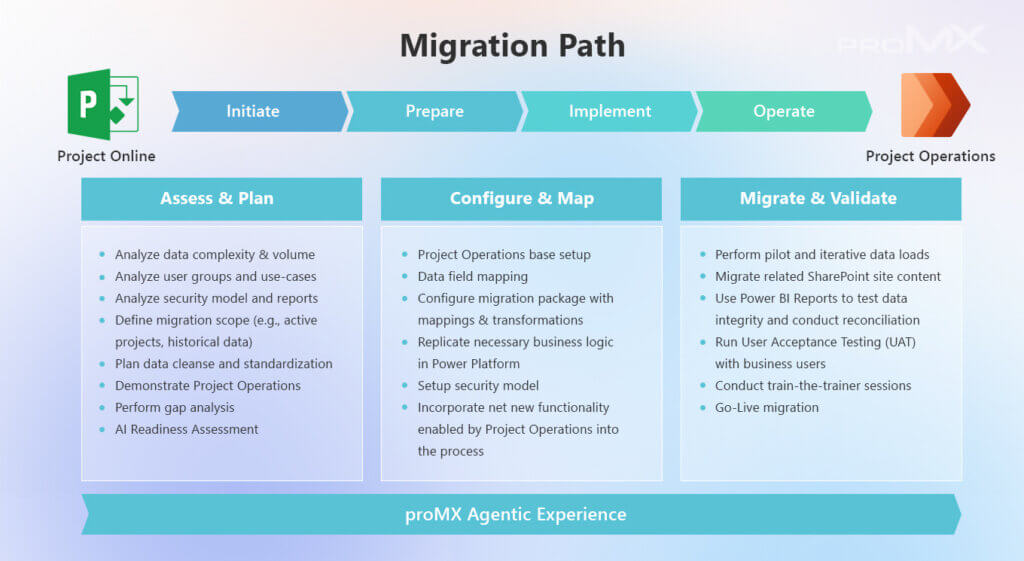
Note: proMX offers a free-of-charge 1-day assessment service so that you have a better idea of what you are working with and the scope of the future migration. Below we‘ll tell you exactly how to claim this service.
Why partner with proMX for your migration?
Choosing the right partner for a Project Online migration can make all the difference. That’s why it’s best to work with the top 0.02 % of Microsoft partners worldwide, the members of the Microsoft Inner Circle. proMX is proud to be among this elite group, with deep expertise in Dynamics 365 Project Operations and a proven track record of delivering high-quality solutions that drive digital transformation. We are keen on anticipating and mitigating the risks and hidden dangers this transition might bring.

Next steps: Join a free migration assessment workshop
Yes, September 2026 may feel far away from now. However, avoid falling for this illusion, as complex migrations (especially to a multi-layered solution like Project Operations) can take time to plan and execute properly. By starting with an assessment now, you’ll have a solid plan and plenty of runway to transition at your own pace with zero last-minute panic.
Not sure which path is right for you? Contact us for a free 1-day Migration Assessment Workshop to help choose the right path and receive a tailored recommendation report.
- Review your current use and deployment of Project Online
- Determine the best path forward (Planner Premium or Project Operations)
- Receive a recommendations report: where to go, why, and what the effort would be
- Take the guesswork out of your migration and start with a clear, expert-backed roadmap
At the end of this assessment, you’ll receive a Recommendations Report. This report will outline our findings and propose a tailored migration roadmap for you.
Ready to get started? Contact us today to schedule your free Project Online Migration Assessment workshop. Let’s work together to ensure your project management tools are not only up-to-date but truly empowering your teams to deliver success. Your journey beyond Project Online can be smooth, strategic, and even exciting – and proMX is here to guide you every step of the way.



RECENT POST
OUR EVENTS