
Comparing Dynamics 365 Contact Center with and without Customer Service
Content
Your customers expect fast, consistent support no matter which channel they choose. That doesn’t make them exceptionally demanding, though. Their time is as valuable as yours and, fortunately, there are tools that allow save it for both parties. This is where a Dynamics 365 Contact Center comes into play. But what value does it really provide on its own, and when does it make sense to seek support elsewhere?
To set the stage, we’ll start with the basics: what Contact Center actually is and how it supports customer interactions. From there, we’ll walk through typical service processes and compare scenarios with and without Dynamics 365 Customer Service. Finally, we’ll take a brief look at where this space is heading in the future.
Highlights
- Consistent service delivery across every channel
- Continuous customer support before and after they contact you
- A single source of truth for customer context
- Dynamics 365 Contact Center functionality as is and enhanced by Customer Service
- Еhe foundation for AI-driven service innovation
Acts of (customer) service
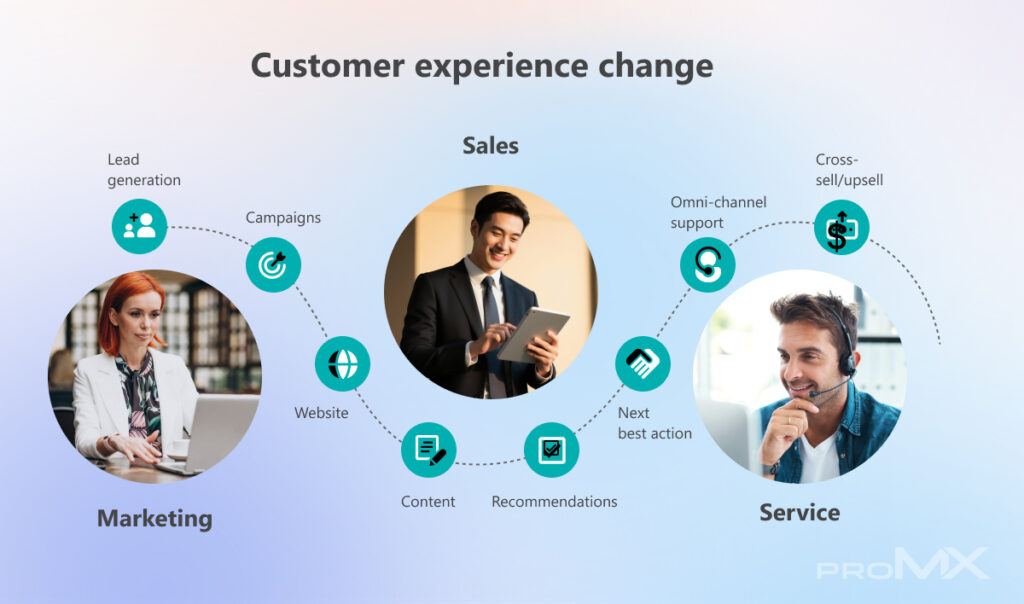
If we look at the process from the beginning, everything usually starts with lead generation: through campaigns, website interactions, and customer engagement. Hopefully, the content created by your marketing team doesn’t go unnoticed. Customers receive relevant content, recommendations, and next best actions, and at some point, they decide to reach out to the company.
Self-service vs. customer service
No doubt, everyone has been in the customer’s shoes at least once: it’s 1AM and you are suddenly online shopping for, say, a 3D printer, an electric heater, or a brand-new set of fishing hooks. There are so many questions you’d like to ask, but no one is there to answer them.
In order to give customer service some structure, it is useful to divide service into two parts:
| Self-service | Customer service |
| Customers can help themselves before even reaching out to you Information is either publicly available or after logging in They can use knowledgebase articles, chatbots, or discussion platforms to find the information they need | Customers get in touch with the company because they need information, spare parts, support, etc. Quotas and response times can be guaranteed Contact options are predefined: phone, e-mail, WhatsApp, etc. |
Dynamics 365 Contact Center handles both self- and customer service and unifies them in one place.
Contact Center: The mediator between you and your customer
If you look at it from far away, the situation might look simple: you have customers on one side, agents on the other, with different communication channels in between. However, once you take a closer look, agents cannot handle every task efficiently without a proper structure. They need access to context, be it either from their own experience or from a shared system.
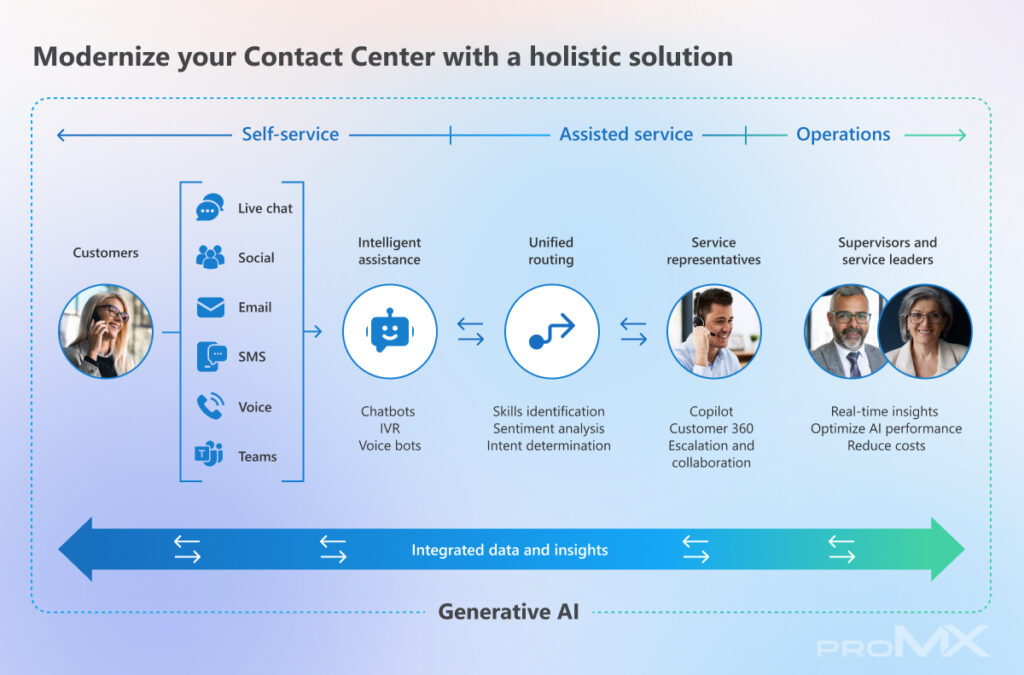
The goal is to move the context out of individual heads and into a centralized database. This is exactly what Dynamics 365 Contact Center is designed to do. It bundles all channels into one direction so they can be handled in the back office.
Service with and without Dynamics 365 Customer Service
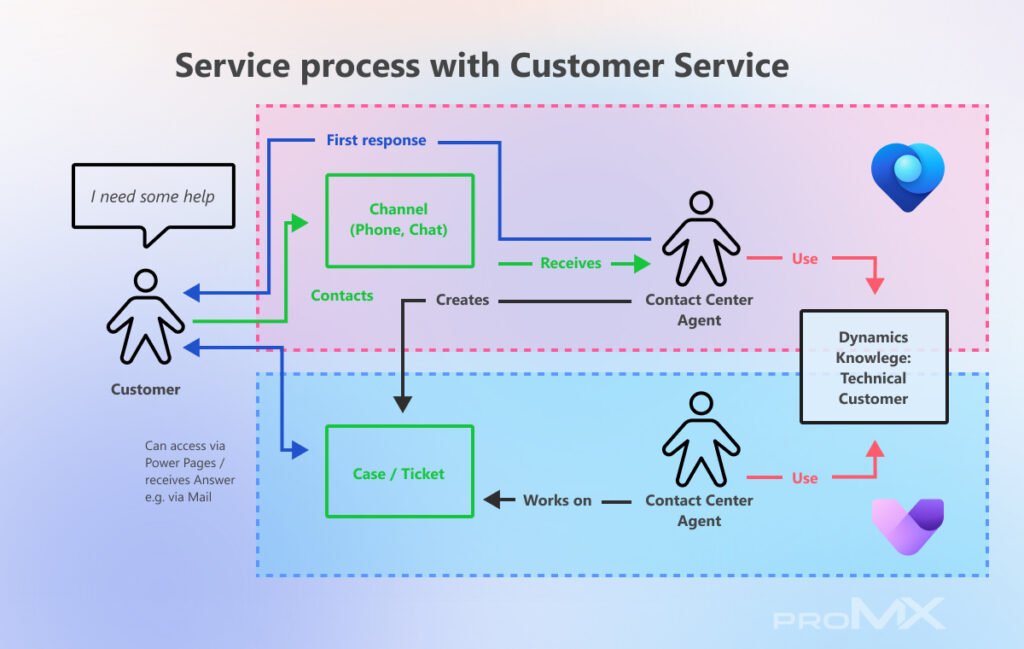
If you stop at Dynamics 365 Contact Center, you already gain a powerful foundation. You can unify channels such as chat, voice, email, and social messaging, centralize customer interactions, and route requests based on skills, capacity, or predefined rules. However, operating Contact Center as it introduces some natural limitations.

While cases can still be created from interactions, you miss the full scope of structured case management. Features such as SLA tracking, entitlements, detailed activity history, and built-in service KPIs are not available out of the box. Knowledge management also becomes more manual, as there is no seamless process to convert resolved issues into reusable knowledge articles.
What changes with Customer Service?
Adding Dynamics 365 Customer Service transforms the Contact Center from a communication hub into a fully connected service platform with:
- Extended Copilot context on case
- Split Agents in Backoffice and 1st line Agents
- Full case functionality with SLAs, reporting, etc.
- Full knowledge base functionality
- Full service KPIs, service hub and end-to-end process
- Possibility to use Power Pages (Self Service)
- Good extensibility (FieldService, Sales, Project Operations)
- Optimized license cost
Looking ahead: AI, Copilot, and autonomous service
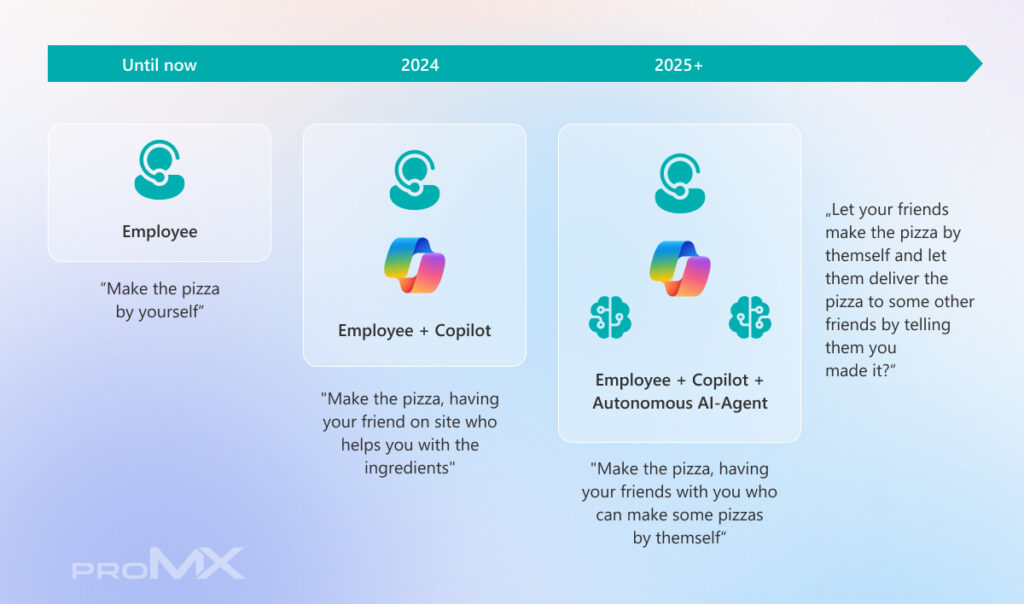
The evolution of Contact Center solutions does not stop here. AI is already reshaping how service is delivered. Today, Copilot acts as an assistant that helps agents work faster and more accurately. In the near future, autonomous agents will take on entire categories of service requests, which means:
- Routine inquiries can be handled without human intervention
- AI can detect intent, sentiment, and urgency instantly
- Knowledge bases can be updated automatically
- Service processes become increasingly proactive rather than reactive
Conclusion
Dynamics 365 Contact Center centralizes communication and context between customers and service teams. It can bring substantial value on its own through channel unification and improved accessibility. However, combined with Dynamics 365 Customer Service, it becomes something more: a complete, intelligent service ecosystem.
Interested in learning more? Watch a full session by proMX expert Kai Pautsch on Comparing Dynamics 365 Contact Center with and without Customer Service.
At proMX, we help organizations turn their customer service pain points into strengths. Contact us today, let’s modernize your service together, and make every interaction count!
FAQ
What is Dynamics 365 Contact Center used for?
Dynamics 365 Contact Center is designed to manage and unify customer communication across multiple channels. It centralizes interactions and provides customer support agents with the context they need to respond efficiently.
Can I use Dynamics 365 Contact Center without Customer Service?
Yes, you can use Contact Center on its own to handle communication, routing, and interaction management. However, you will miss out on advanced capabilities such as structured case handling, SLAs, and built-in service KPIs.
How does self-service fit into the Contact Center?
Self-service allows customers to find answers independently through knowledge-base articles, chatbots, or portals before contacting support. This reduces workload on agents and improves response times.



RECENT POST
OUR EVENTS