The future of finance is automated: How AI in Dynamics 365 Finance is changing the rules
Content
ERP systems are known to give organizations an overview of all core business processes, hence, show what is happening in your company across several departments. However, now they are becoming more than a tool: AI is turning systems like Microsoft Dynamics 365 into intelligent platforms that actively take on daily repetitive tasks.
But how does this change the conventional rules of financial operations, and how is AI in Dynamics 365 Finance streamlining tasks such as account reconciliation or automating reporting for finance teams? If you’ve asked yourself the same questions before and are curious about what Copilot and AI agents have to offer, then you’ve come to the right place.
Below we will explore how AI is now impacting the finance sector, focusing on the D365 Finance app, and how you as a financial leader can benefit from this system enhancement.
Why AI matters for finance teams in 2026
Although AI is not new in the finance space, many professionals are still scrolling infinitely through spreadsheets instead of making real-time AI-powered data decisions. This leads to many spending several hours per week on repetitive manual tasks. As a result, finance teams are not only losing motivation but also potential for creating operational efficiencies. AI is the key to transforming raw data into actionable insights, and the results are starting to show.
According to a KPMG study from 2025, most financial leaders (65.58%) agree that AI and data investments are accelerating growth, enhancing employee and customer experiences, improving productivity, and increasing profitability. Moreover, one in four leaders identifies increased profitability as the primary advantage resulting from these investments. This widespread agreement among leaders highlights a growing consensus that AI is not just a technological upgrade, but a critical driver of financial performance and operational excellence.
When teams start to invest in digital transformation, including AI, Finance becomes a strategic growth engine. The same costs for data wrangling and modeling can go towards more strategic decision-making and innovation of processes — shifting from predictive analytics to strategic advising. However, investing in those solutions also requires investing in your team: For financial professionals to truly improve efficiency with AI, they need to develop skills like data science and AI fluency, enabling them to fully leverage the capabilities of AI.
Microsoft Copilot for D365 Finance: Your personal AI assistant
What is Copilot in Dynamics 365 Finance?
New challenges require new solutions: As finance teams navigate through messy data sources, Microsoft Copilot comes to the rescue and works across all data from the Microsoft ecosystem (Dynamics 365, Azure, Power Platform, and Microsoft 365). With the role-based Finance solution in Microsoft 365 Copilot you can turn tedious manual tasks into enriched AI-powered actions. And the best thing is that you don’t need any developer skills to get started.
Copilot in Dynamics 365 Finance acts as a personal financial assistant to which you can talk in natural language and give instructions such as “Share the Accounts Receivable reconciliation for this quarter” or “Draft an e-mail response to Janik updating him on the forecasts for H1 2026”. It will work in real-time accessing your financial data while you are busy with strategic tasks, saving you time, and enhancing the efficiency of your work. Once you have created a recurrent workflow for the first time, you can save it as a template for future tasks. This makes it easier to get started the next time you need to complete the same task.
The top 8 Copilot capabilities in D365 Finance
1. Generative help and in‑context guidance
Copilot’s built‑in guidance is especially helpful for teams navigating complex finance applications or processes. When someone needs to remember how to configure a payment schedule in D365 Finance, Copilot can instantly surface the right documentation, link to a Microsoft Learn article, or walk them through the steps.
2. Shift‑start summaries and collections overviews
For daily operational roles like collections coordinators, Copilot provides a quick snapshot of what needs attention as their day begins, such as overdue accounts, customers who recently promised to pay, or disputes awaiting follow‑up.
3. Workflow insights
Finance workflows, like vendor invoice approvals or expense reports, can span multiple steps and people. Copilot surfaces a clean summary of the workflow instance, so users don’t have to scroll through long approval histories. This makes it easier for Account Payable teams or managers to understand delays or act quickly, contributing to smoother operations.
4. Automated data preparation
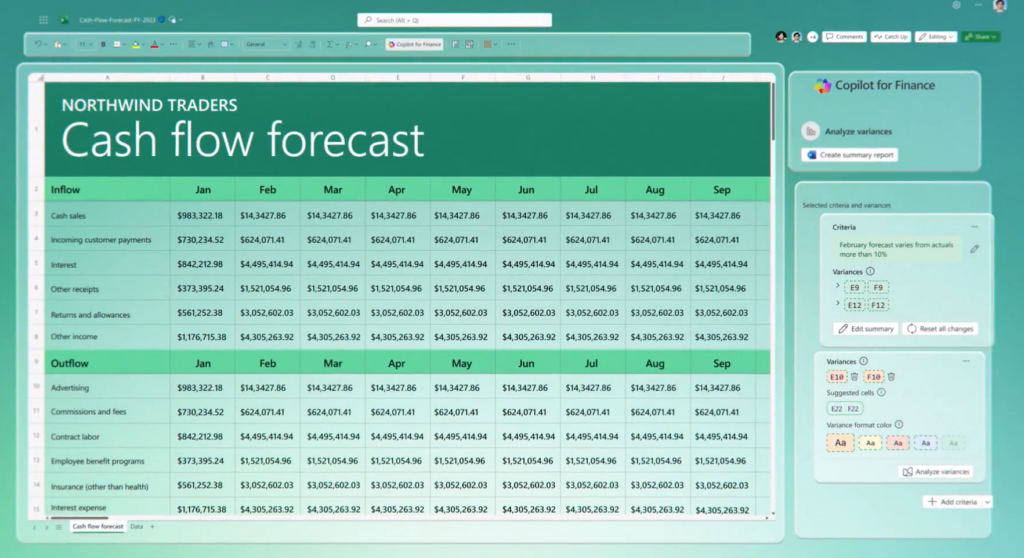
Much of finance reporting begins with exported ERP data. Copilot removes the manual cleanup by identifying column types, correcting data gaps, and reshaping tables automatically. For example, instead of spending half an hour reformatting a trial balance export for month‑end commentary, FP&A analysts receive an analysis‑ready dataset instantly speeding up every downstream task.
5. Customer communication assistance
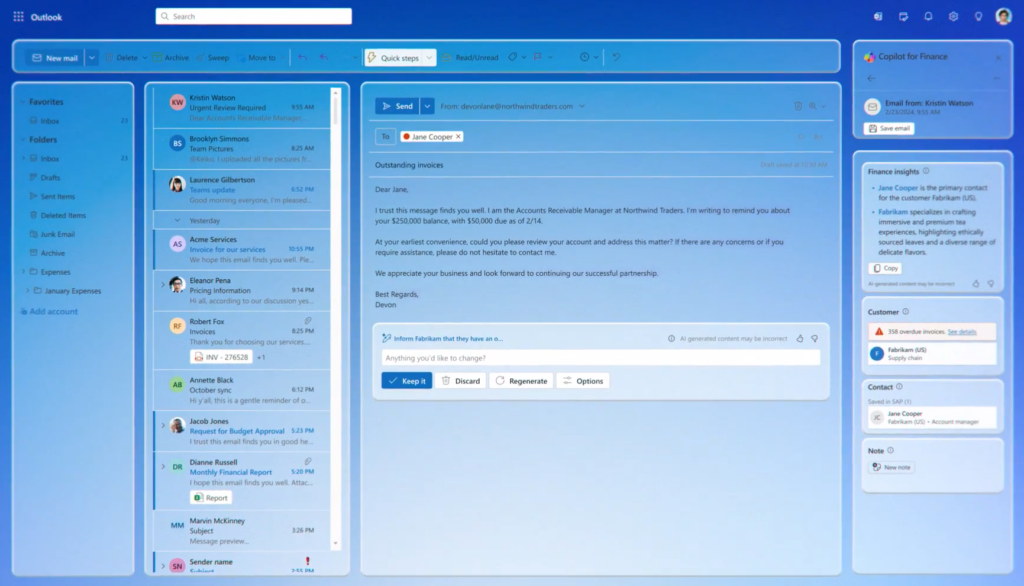
Responding to customers about invoice discrepancies, payment status, or credit limits can take up a significant portion of AR teams’ day. Copilot creates draft messages in Outlook based on real ERP data. If a customer asks why an invoice is still outstanding, Copilot can pull in the status, due date, past communications, and recent payments. This ensures timely, accurate communication and supports healthier cash flow.
6. Variance analysis support
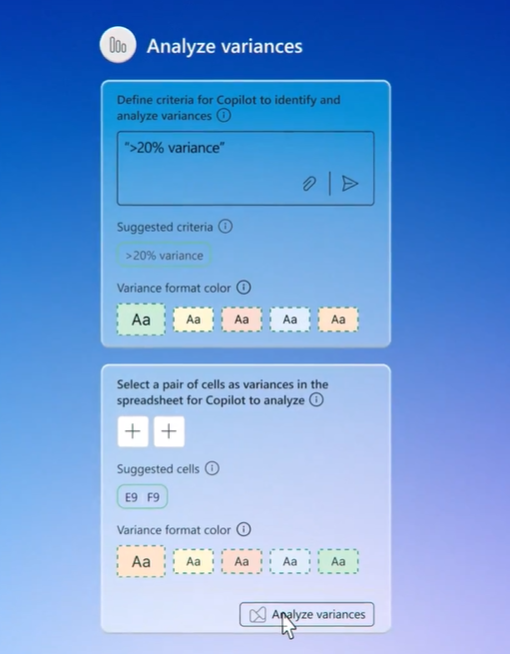
For controllers and FP&A teams, quickly understanding why actuals differ from forecast is essential. Copilot accelerates this work by automatically highlighting unusual deviations and surfacing potential explanations, such as unexpected cost spikes in a specific region or shifts in revenue mix. This helps teams spend more time interpreting insights and less time hunting for them.
7. Financial reconciliation automation

Reconciliation is one of the most effort-intensive processes in finance, whether it’s reviewing bank statements, clearing subledger differences, or validating intercompany balances. Microsoft Copilot acts as a dedicated reconciliation assistant in Excel, scanning transactions, flagging exceptions, and suggesting matches. It also reviews the user’s adjustments, reducing errors, and shortening close cycles — one of the clearest sources of ROI for many finance organizations.
8. Enterprise‑grade security and governance
For CFOs and finance leaders, trust and compliance are non‑negotiable. Copilot operates entirely within the Microsoft 365 security model, ensuring that ERP data stays protected under existing role‑based access, audit controls, and compliance policies. This gives leaders confidence that sensitive financial data remains inside the organization’s governed boundaries, making Copilot safe to use across all finance scenarios.
AI Agents and Copilot Studio: The key to scalable financial operations
What are Copilot agents and how do they support finance?
Copilot agents in Dynamics 365 Finance are autonomous, AI‑powered assistants that continuously interact with your financial data to detect anomalies, generate accurate forecasts, and proactively flag exceptions in real time. Built on native ERP data and business logic, they communicate with systems of record 24/7 — streamlining supplier management, accelerating period close, and improving overall financial performance. Unlike Microsoft Copilot assistants, these agents don’t need prompting and act as always‑on collaborators that guide users, automate end‑to‑end processes, and enhance decision‑making quality.
Types of agents within D365 Finance
Supplier communication agent
One agent that helps you save time and provides up-to-date information to your vendors is the “supplier communication agent”.
Common capabilities:
- Automatically requests delivery confirmations, shipping updates, and revised ETAs from suppliers.
- Flags missing or inconsistent supplier responses and prompts users only when human decisions are required.
- Reduces manual email back‑and‑forth and shortens the lead time for updating purchase orders.
Example: When a supplier delays a shipment, the agent updates expected delivery dates across the system and notifies procurement instantly. Thanks to the agent, you won’t ever need to dig through inboxes.
Account reconciliation agent
This autonomous agent can detect financial discrepancy in real‑time making reconciliation less tedious and more efficient.
Common capabilities:
- Continuously scans ledger entries, bank statements, and subledgers to identify mismatches before month‑end.
- Replaces static reconciliation spreadsheets with real‑time alerts and guided prompts.
- Suggests corrective actions and escalates issues that require human approval.
Example: If AP invoices and GL entries don’t match, the agent identifies the discrepancy and prompts the accountant with the exact correction needed, speeding up period close.
Time & expense agent
Finally, the “time & expense agent” feature enables tracking employee working hours and provides comprehensive reporting of expenses.
Common capabilities:
- Automatically pulls meeting data and travel details from Outlook to pre‑build timesheets and expense claims.
- Ensures policy compliance by validating receipts, mileage, and categories before submission.
- Reduces repetitive data entry for employees and accelerates manager approvals.
Example: After a business trip, the agent drafts a complete expense report (hotel, mileage, meals) and flags any entries that violate company policy.
Copilot Studio for the finance sector
Apart from the out-of-the-box agents mentioned in the previous section, businesses can also create their own. Copilot Studio allows businesses to tailor agents for maximum efficiency, rather than depending only on pre-built options.
How to create a Copilot agent:
- Describe what you want your agent to do.
- Name your agent.
- Press create.
- Add specific capabilities and reasoning.
- Publish agent.
- Test agent.
- Recommended: Adjust agent according to your changing business needs.
With Copilot Studio, companies can start by launching simple, individual agents and later scale into full agentic orchestration, where agents not only support employees but also collaborate with each other to streamline complex financial operations. Powered by large language models, Copilot Studio makes it easy to design retrieval agents, task agents, or fully autonomous agents that plan, learn, escalate, and execute work across Dynamics 365 Finance.
Whether it’s guiding new employees through the most-used Finance & Operations forms, assigning agents to recurring tasks, or triggering automated workflows based on business rules: Copilot Studio provides a flexible, human‑verified way to modernize financial processes and ensure systems stay accurate, compliant, and continuously improving.
What are the benefits of AI in Dynamics 365 Finance?
Now you know what you can do with AI in Dynamics 365 Finance, but what are the main benefits of using this technology in your daily tasks?
1. More efficiency and time
Copilot and AI agents work together to automate time‑consuming tasks like reconciliations and data consolidation, helping finance teams reduce manual work and focus on more strategic activities.
Example: An AI agent automatically matches transactions overnight, while Copilot drafts supplier emails to resolve the remaining exceptions — cutting hours from the reconciliation process.
2. Smarter insights in real-time
Dynamics 365 Finance makes it easy to uncover trends and understand financial performance by allowing teams to ask questions in natural language and instantly receive clear, data‑driven insights and visualizations.
Example: A manager asks, “Which customers might pay late?” and Copilot immediately returns a predictive list along with ready‑to‑share charts for presentations or team updates.
3. Early anomaly and financial risk detection
AI agents continuously monitor financial data and flag unusual patterns, spending spikes, or unmatched entries so teams can act before small issues turn into larger financial risks.
Example: When an AI agent detects an unexpected rise in marketing spend, Copilot generates a concise summary explaining the anomaly and suggests appropriate follow‑up actions — well before the month‑end close.
4. Improved internal and external collaboration
By integrating AI capabilities into Outlook, Excel, and Teams, Dynamics 365 Finance helps teams communicate accurately and efficiently with real‑time ERP data at their fingertips.
Example: Copilot summarizes a long customer email thread, retrieves the correct financial information from Dynamics 365 Finance, and drafts a polished, data‑accurate reply—saving time and reducing the risk of miscommunication.
5. Faster and more strategic decision-making
AI-powered recommendations, automated scenario modeling, and real‑time visibility empower finance leaders to make smarter budgeting, forecasting, and investment decisions faster and with greater confidence.
Example: AI agents generate several forecast scenarios for the next quarter, and Copilot recommends the strongest option with a clear explanation and a presentation-ready summary for leadership meetings.
Conclusion
As our title already gives away, the future of finance is automated, and with capabilities like real-time insights, AI-driven risk detection, and streamlined collaboration, Dynamics 365 Finance is at the forefront of this transformation. The old rules of traditional ERP systems—manual reconciliations, spreadsheet-heavy reporting, and reactive processes — are being replaced by automated workflows, real‑time insights, and intelligent agents that work continuously in the background. As Copilot and customizable AI agents become standard tools, finance teams can expect faster closes, earlier risk detection, and more strategic, insight-driven operations. The future of finance is clear: less manual effort, more intelligence, and a finance function that acts as a proactive driver of growth rather than a reactive processor of data.
Want to streamline your financial operations with Dynamics 365 Finance?



RECENT POST
OUR EVENTS