
How energy companies benefit from Microsoft Copilot: practical use cases
Content
Highlights
- Microsoft Copilot addresses a core challenge in the energy industry: information exists, but is difficult to access and use reliably in day‑to‑day operations.
- The greatest value lies in operational contexts: control rooms, maintenance, HSE (Health, Safety & Environment), permitting, and trading benefit from faster incident classification, improved documentation, and clearer decision foundations.
- Copilot does not replace line‑of‑business systems; it connects people with existing data, documents, and processes.
- For a successful start, a pragmatic approach is key: address real bottlenecks first, then extend usage selectively.
Energy companies operate under significant pressure today. Assets are becoming more complex, regulatory requirements continue to increase, skilled labor is scarce, and operational decisions must be made faster than ever. At the same time, the volume of information that needs to be processed daily keeps growing: alarm notifications, work orders, safety regulations, permitting documents, market reports.
Information exists in abundance in many organizations, scattered across emails, documents, ticketing systems, and applications. The key question is how to make this information usable at the right moment.
This is where Microsoft Copilot comes in. It supports employees directly in their daily work context, without the need to introduce new tools or fundamentally redesign processes – by summarizing information, creating reports, assessing risks, and preparing decisions.
This article shows where Copilot can be used effectively and why it can deliver tangible value for the energy industry.
Why is Copilot relevant for energy companies?
Operational work in energy companies is tightly linked to physical assets (power plants, vehicles, equipment, and more). Decisions directly impact safety, availability, and costs, and many processes are governed by regulation. The following four conditions make Copilot particularly relevant:
High information pressure in daily operations
Whether in control rooms, maintenance, or HSE, many roles spend a large portion of their time searching for, consolidating, and preparing information. Copilot can summarize documents, tickets, logs, or emails in context and highlight what matters.
Operational and safety‑critical processes
In areas such as asset operations, maintenance, or occupational safety, speed and reliability are crucial. Copilot primarily supports preparation and documentation through structured situation reports, clear summaries of technical manuals, or consistent reports for audits and authorities.
Knowledge is distributed and often person‑dependent
Experience from past projects, incidents, or permitting procedures is often difficult to find or tied to specific individuals. Copilot makes existing knowledge accessible across documents and systems and presents it in a clear, understandable way.
Measurable impact on key metrics
Copilot’s value becomes visible through classic performance indicators: shorter downtime, faster incident analysis, reduced documentation effort, and quicker permitting cycles. This is particularly relevant for managers who need to clearly demonstrate efficiency gains and risk reduction.
Key Copilot scenarios for the energy industry
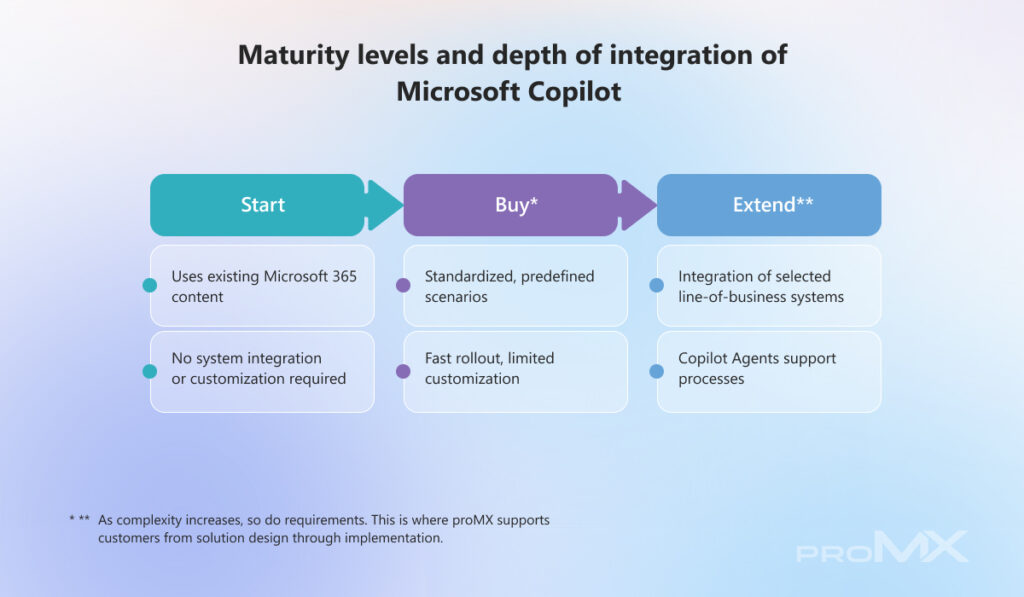
Assets, incidents, and operational risk
Create shift briefings and handover notes (Start)
Copilot Chat condenses notes, tickets, policies, and external notices into a structured shift overview. Risks are prioritized, open issues flagged, and a concise handover note is created for use in email or Microsoft Teams.
Weekly overview of incidents and risks (Start)
Copilot Chat analyzes current operational data, highlights anomalies, identifies recurring reliability risks, and prioritizes them based on impact and urgency. Results are summarized in a clear weekly overview for management and teams.
Assisted alarm analysis (Extend)
A Copilot Agent provides asset context for a specific alarm code, describes potential root causes based on operations and maintenance documentation, and suggests appropriate actions. It also supports report creation and ticket setup.
Resolve incidents faster (Extend)
For field teams, Copilot summarizes daily work orders, finds relevant steps in operating and maintenance manuals, explains error codes in plain language, suggests remediation actions, and generates closing notes for completed work orders.
Safety and compliance
Accelerate HSE and safety inspections (Buy)
New regulations are summarized, existing checklists updated, and photos analyzed for potential risks using multimodal analysis. Copilot creates stakeholder communications, generates a safety report, and compares findings against the contractor’s scope of work and HSE plan.
Update safety plans and checklists (Start)
Copilot summarizes existing safety plans, extracts relevant procedures and personal protective equipment (PPE), creates task‑specific checklists, and drafts a pre‑job briefing for distribution to involved teams.
Permitting processes
Structure Permitting Procedures (Extend)
Copilot identifies relevant regulations, links authoritative sources, and compares requirements across regions. It prepares a baseline structure for environmental or permitting documents and populates sections with available data.
Knowledge management
Review and reuse past projects (Start)
Based on criteria such as region or time frame, Copilot finds relevant reports, notes, and permitting documents, extracts lessons learned, highlights knowledge gaps, and generates an annotated reading list that includes onboarding recommendations.
Trading, market analysis, and business development
Prepare business decisions faster (Extend)
A Copilot Agent aggregates market information from curated sources. Copilot creates a short‑term market outlook, including sentiment analysis, supports credit risk checks, uses meeting summaries for contract changes, and drafts contracts and meeting minutes.
Structure EV charging business development (Buy)
Copilot supports the assessment of EV charging market potential, prepares location and usage data in Excel, outlines a management presentation in PowerPoint, and creates a concise decision script in Word.
Measurable benefits energy companies can expect
Microsoft Copilot delivers measurable value across several dimensions:
Operational productivity
Copilot takes over time‑consuming routine tasks such as compiling reports or consolidating information from multiple sources. Employees gain time for assessment and decision‑making, resulting in faster response times and higher operational throughput.
Reduced downtime and response times
By consolidating information from alarms, work orders, maintenance history, and technical documentation, Copilot accelerates incident classification. Diagnostics and coordination take less time, helping reduce unplanned outages and stabilize operations.
Greater consistency in safety and compliance processes
Copilot helps create structured and consistent inspection reports, documentation, and permitting records. This reduces gaps and inconsistencies, lowers rework effort, and simplifies internal and external audits.
Reduced administrative load for employees
When Copilot prepares summaries, drafts protocols, and makes information easier to find, the administrative burden in technical roles decreases noticeably – relieving day‑to‑day workload.
How energy companies can get started
A structured introduction is essential to avoid overload. The deployment does not need to be large‑scale or technically complex and can be broken down into three steps:
Step 1: Start with existing processes
If you already use Microsoft 365, this is the most logical starting point. Copilot can support without changing processes – by summarizing meetings, drafting reports, or structuring information from documents and emails.
Step 2: Prioritize operational use cases
Next, focus on areas with high time pressure or operational risk, such as project preparation, asset maintenance, or occupational safety. Fewer, clearly defined use cases with measurable value are often more effective than broad rollouts.
Step 3: Extend integrations selectively
Once you understand where Copilot delivers real value, you can consider integrating line‑of‑business systems, for example via Copilot Studio or specialized Agents.
Conclusion
Microsoft Copilot is a tool with a direct connection to the daily work of energy companies. It makes information quickly accessible, clarifies relationships, and supports better decision‑making. Many entry‑level scenarios can be implemented pragmatically in just a few steps and with manageable effort.
For some teams, this level of support is sufficient. Others quickly face questions around integrations and Copilot Agents. These become relevant once Copilot goes beyond information access and is embedded into operational processes, for example through targeted access to line‑of‑business systems and structured data analysis.
As depth increases, so do requirements for architecture, data integration, and governance. In such scenarios, working with an experienced Microsoft partner pays off. proMX supports energy companies from a structured Copilot start to the implementation of complex, organization‑specific use cases.
Let’s check together where Copilot can add the most value in your organization and what the next steps could look like.
Frequently Asked Questions (FAQ)
Where does Copilot deliver value first?
The greatest benefit emerges wherever significant time is spent searching for, summarizing, and documenting information. Typical starting points include operational reporting, safety and compliance documentation, project preparation, or consolidating knowledge from past incidents and projects. A clearly defined use case with measurable value is usually more effective than a broad rollout.
Does Copilot replace existing systems or operational processes?
No. Copilot does not replace control room, asset management, or maintenance systems. Its role is to make information from different sources usable more quickly. In practice, Copilot acts as a supporting layer between people and systems, helping with interpretation, decision preparation, and documentation, while core logic remains in existing systems.
Is Microsoft Copilot safe to use in regulated energy environments?
Microsoft Copilot operates within the existing security and permission models of Microsoft 365. Users can only access information they are already authorized to see. Copilot does not access data freely and does not make autonomous decisions.



RECENT POST
OUR EVENTS