Integrating SAP and Dynamics 365: scenarios and best practices
One of the most widely used platforms for enterprise resource planning (ERP) is SAP. Microsoft Dynamics 365 is a common choice when the need for integration with customer relationship management (CRM) arises.
Both systems can work together seamlessly, and in this article we’ll explore a typical integration scenario that connects core business processes across SAP and Dynamics 365.
We’ll use a simplified schema as an example, and walk you through how data such as customer records, product information and financial transactions flows between the two systems.
Scenario breakdown
From sale to invoicing and payment, each step in this process highlights how a structured data flow can reduce manual work, avoid duplication and ensure consistency across departments.
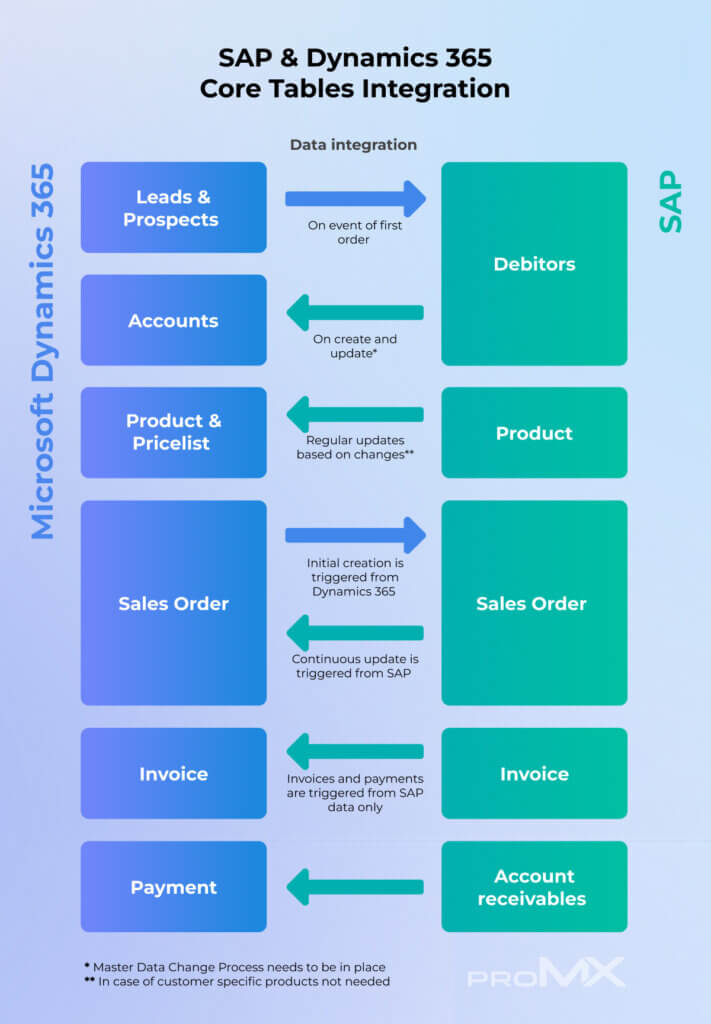
Let’s take a look at how and why at each part of the broader integration scenario:
1. Leads & Prospects → Debitors (Customer Master)
When a lead in Dynamics 365 becomes a customer and places their first order, the system sends their information to SAP. SAP can immediately process the order for billing, fulfillment and reporting without requiring duplicate data entry.
Trigger: First order placed (manual or automated)
2. Accounts ← Debitors
Customer information is centrally managed in SAP and synchronized into Dynamics 365. It ensures the teams working in Dynamics 365 always have access to the most up-to-date customer records, prevents data conflicts and ensures consistent information across systems.
Trigger: Creation or update of a customer record in SAP
💡 Note: In this setup, customer data should be modified only in SAP. A read-only or restricted access for Dynamics 365 users helps avoid data inconsistencies.
3. Product & Pricelist ← Product (Product Master)
Product and pricing data can be imported into Dynamics 365 from SAP. This allows teams to work with accurate product information.
Trigger: Regular updates or changes to products in SAP
💡 Note: This is usually a one-way sync unless customer-specific pricing or configurations require additional updates.
4. Sales Order ↔ Sales Order
Sales orders are created in Dynamics 365 and are passed to SAP for fulfillment, inventory checks and backend processing. SAP may then update the order with fulfillment or delivery details. This ensures accurate order fulfilment.
Trigger: Creation of a sales order in Dynamics 365
5. Invoice ← Invoice
SAP handles the creation and processing of invoices and maintains financial accuracy and centralized control over billing.
Trigger: Order processing in SAP
6. Payment ← Account receivables
Payments and collections are managed in SAP. However, the status of these payments is shared with Dynamics 365. This gives teams better visibility into financial status during interactions and improves reporting.
Trigger: Payments received or status changes in SAP
Considerations and best practices when integrating SAP and Dynamics 365
The structure and complexity of the data involved when integrating Microsoft Dynamics 365 with SAP varies from one organization to another. To ensure a successful integration, here are some considerations and best practices based on proMX’s experience with such projects:
Tailor the synchronization to your data structure.
The specific data that needs to be synchronized depends on the company’s internal data structure and integration needs. Since no two organizations are exactly alike, there is no “standard” integration template. Every project requires custom alignment of data fields, logic and timing.
Conduct discovery workshops.
Before building any integration, hold dedicated workshops with key stakeholders. These sessions should focus on:
- Understanding the structure of data in both source and target systems
- Identifying business processes affected by the integration
- Clarifying functional and technical requirements
Document the synchronization logic.
Once the data mapping and synchronization rules are defined, it is critical to document them thoroughly. This documentation is important for development and configuration, testing and validation, and long-term maintenance and scalability.
Follow an agreed synchronization strategy.
Finally, the actual data exchange should follow the documented principles, including:
- Which system is the “source of truth” for each data entity?
- How often does synchronization occur (real-time, scheduled, event-based)?
- What do error handling and logging procedures look like?
Conclusion
Integrating Microsoft Dynamics 365 with SAP creates a connection between a customer-facing (CRM) and an operational system (ERP). The integration scenario itself depends on your individual business requirements and processes. proMX is here to support your integration project with expertise and experience – let’s talk!



RECENT POST
OUR EVENTS